Subscriptions
Subscriptions offer a single subscription with access to all features. The following subscriptions exist for Swagger:
Trial - A trial period is available to test Swagger before purchasing. See Trial Subscriptions.
Self-Service (e-commerce) - self-service subscriptions are purchased and managed online and auto-renew until canceled.
Sales-managed (sales-assisted or direct) - Sales-managed subscriptions are purchased and managed by your SmartBear account manager.
Expired - After your trial or paid subscription ends, your organization switches to the free, unpaid plan for the Swagger product you previously subscribed to.
After moving to an unpaid plan, your organization is no longer eligible for another self-service trial for the same Swagger product. To request more trial time, contact the Sales team.
Click the Subscription tab on SmartBear Admin to view the subscription plan details as follows:
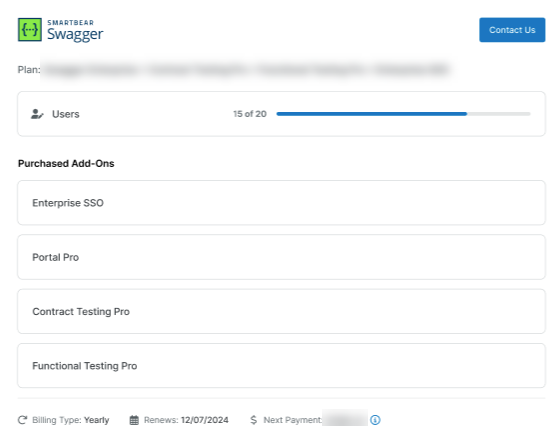
Plan - The name of the subscribed Product (for example, Swagger). The specific plan to which the organization is subscribed.
User - For the Enterprise subscription, you can view detailed limits that show how many seats are assigned to the users. Also, for e-commerce subscriptions, you can only view the limit count.
Purchased Add-Ons - Displays the list of Swagger Products that have Pro add-on licenses.
Enterprise SSO - Displays the status of enterprise SSO, whether SSO is purchased or not purchased. Click Contact Us to contact the SmartBear team for more information on Enterprise SSO.
Displays the renewal date, subscription payment, and billing type, such as a yearly or monthly subscription.
For trials, this is the date the subscription will end unless a purchase is made. For organizations with a trial or expired plan, admins can purchase a self-service plan.
For sales-managed subscriptions, this is the date the subscription will end unless renewed for organizations with a Sales-Managed (sales-assisted or direct) plan. Organization Admins can click Contact Sales to make any changes to the subscription.
For self-service plans, this date is when the credit card will be charged for renewal unless the subscription has been canceled. For organizations with an active self-service (e-commerce) subscription, admins can modify or cancel the subscription.
Important
Suppose a subscription fails to renew due to a payment processing failure. In that case, SmartBear offers a three-day grace period so that your organization can address billing issues while users can continue to work. The period is extended to 14 days.
Cancel Downgrade - Click Cancel Downgrade if you want to retain the existing features and seat limits. This option lets you continue with your existing subscription plan.
Modular Plan Subscription
If you are on a Modular plan, you can view the following details:
Note
SmartBear is rolling out this feature to a limited set of accounts. Some users may not yet have access. Contact the sales team for more information.
Editor Seats - specifies the number of editor seats currently in use out of the total number available in the subscription. This section also details the seat usage in each Swagger product
Under Add-ons, you view the following details:
Viewer Seats - This section displays the total number of viewer seats purchased and how many are in use.
Enterprise SSO - Displays the status of enterprise SSO, whether SSO is purchased or not purchased. Click Contact Us to contact the SmartBear team for more information on Enterprise SSO.
Subscription Ends - Displays the subscription end date.
For sales-managed subscriptions, this is the date the subscription will end unless renewed for organizations with a Sales-Managed (sales-assisted or direct) plan. Organization Admins can click Contact Sales to make any changes to the subscription.