
Search API
You can use Zephyr Enterprise REST API to search for test cases, requirements, and executions programmatically.
Request URL
GET http(s)://{ZEPHYR-SERVER}/flex/services/rest/latest/advancesearch?
      word=<text>
      &entitytype=<entitytype>
      &releaseid=<id>
      &zql=false
      &isascorder=true
      &order=<fieldname>
      &firstresult=0
      &maxresults=100
      &is_cfield=false
Authentication
You can authenticate your requests by using one of the methods described in the Zephyr REST API topic.
Request parameters
| Value | Type | Description |
|---|---|---|
| word (required) | string | A string to search for. You can specify some text or a ZQL query (in the latter case, you will have to specify zql=true in the request URL). For example:
|
| entitytype (required) | string | The type of the entity to search for. Possible values:
|
| releaseid (required) | long | The ID of the release the entity belongs to. To see the release ID in Zephyr, click Manage Release in the top-right corner and take a look at the value of the ID column in the subsequent window: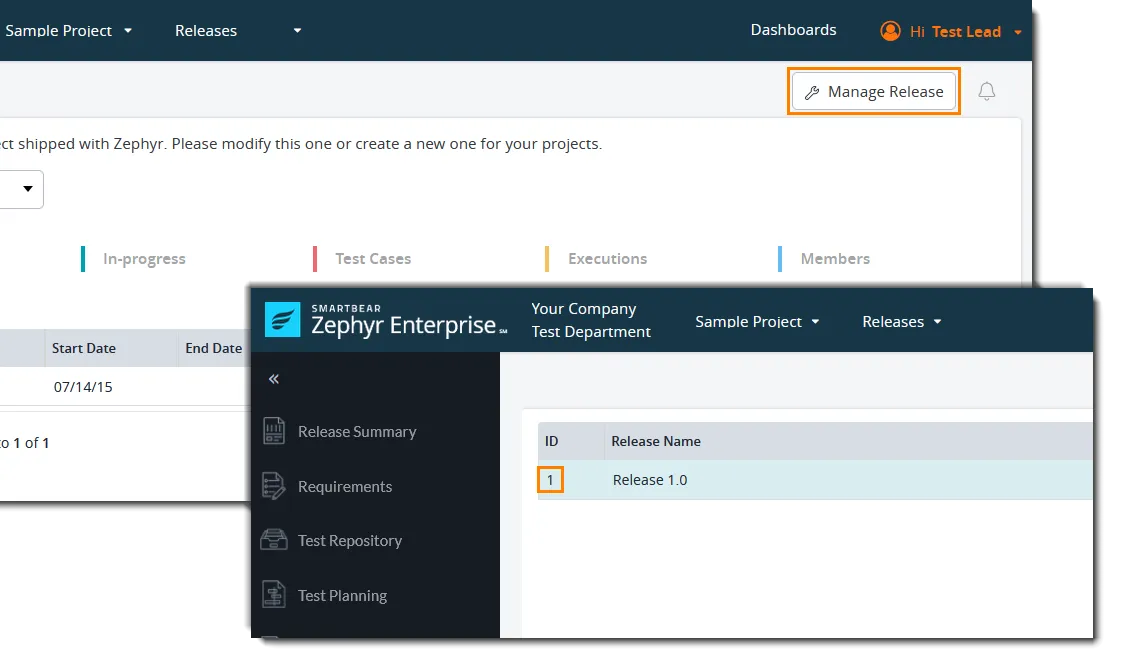 |
| zql (required) | boolean | Specifies whether ZQL is used. false by default. Set it to true if the word parameter contains a ZQL query. |
| isascorder (optional) | boolean | Switches the ascending order. Specify true to sort the results in the ascending order or false to sort them in the descending order. By default, it is true. |
| order (optional) | string | The field to sort data by (this can be either a standard or a custom field). For example: testcaseId, automated, priority, creatorId, orderId and so on.The default parameter value is orderId. If you specify a custom field, you will also have to set the is_cfield parameter to true (see below). |
| firstresult (required) | integer | The first element of the retrieved results. The parameter is zero-based, which means you need to specify 0 as the start position to begin with the first element. |
| maxresults (required) | integer | The number of records to be fetched. The maximum number is 100. |
| is_cfield (optional) | boolean | If the order parameter specifies a custom field, set is_cfield to true. By default, it is false. |
Pagination
You can specify the first element of the retrieved results and the number of items to show by using the firstresult and maxresults query parameters respectively. The firstresult parameter is zero-based, which means you need to specify 0 as the start position to begin with the first element. The sample request below will show a list of results starting from the first element, and the maximum number of retrieved items will be 100:
GET /flex/services/rest/latest/advancesearch?word=test&entitytype=testcase&releaseid=1&zql=false&firstresult=0&maxresults=100Sample requests
ZQL is not used:
GET /flex/services/rest/latest/advancesearch?word=test&entitytype=testcase&releaseid=1&zql=false&firstresult=0&maxresults=100ZQL is used:
GET /flex/services/rest/latest/advancesearch?word=creator="test.manager" and priority="P1"&entitytype=testcase&releaseid=1&zql=true&firstresult=0&maxresults=100Sample response
On success, the operation returns status code 200 and a JSON object containing metadata and found results. The structure of these results varies depending on the sought-for entities, items and so on. Below is a sample response obtained when searching for an execution:
[
   {
      "firstResult": 0,
      "resultSize": 1,
      "results": [
         {
            "id": 147,     ----------------------------------- The RTS ID (the execution ID)
            "assignmentDate": "2020-09-15",
            "actualTime": 600,
            "versionId": "1",
            "comment": "This is a comment",
            "testerId": 5,
            "executedBy": 5,
            "tcrTreeTestcase": {
               "id": 308,  ----------------------------------- The TCR Catalog Tree TestCase ID (tctid)
               "tcrCatalogTreeId": 30,
               "revision": 9,
               "stateFlag": 0,
               "lastModifiedOn": 1600168120466,
               "versionNumber": 1,
               "createDatetime": 1600168114777,
               "createdById": 5,
               "modifiedById": 5,
               "testcase": {
                  "customProperties": {
                  },
                  "customProcessedProperties": {
                  },
                  "id": 165, ----------------------------------- The test case version ID
                  "name": "edited 159 testcase edit",
                  "description": "",
                  "lastModifiedOn": 1600169396082,
                  "creationDate": 1600128000000,
                  "createDatetime": 1600168102437,
                  "tcCreationDate": "09/15/2020",
                  "comments": "",
                  "isComplex": false,
                  "estimatedTime": 600,
                  "writerId": 0,
                  "creatorId": 5,
                  "lastUpdaterId": 5,
                  "oldId": 0,
                  "automated": false,
                  "customFieldProcessed": false,
                  "customFieldValues": [

                  ],
                  "testcaseSequence": {
                     "seqNumber": 159
                  },
                  "testcaseId": 159, ----------------------------------- The test case ID
                  "versionNumber": 1,
                  "projectId": 3,
                  "testcaseType": "ORIGINAL",
                  "requirementIds": [

                  ],
                  "projectName": "P1",
                  "requirementIdsNew": [

                  ],
                  "creatorName": "John Smith",
                  "lastModifierName": "John Smith",
                  "automatedDefault": false,
                  "testcaseShared": false
               },
               "projectId": 3,
               "releaseId": 5,
               "isDerivedFromBDD": false,
               "orderId": 453,
               "maxVersionNumber": 1,
               "projectIdParam": 3,
               "original": false
            },
            "cyclePhaseId": 7,
            "lastTestResult": {
               "id": 58,
               "executionDate": 1600169404251,
               "execDate": "09/15/2020",
               "executionStatus": "4",
               "testerId": 5,
               "releaseTestScheduleId": 147,
               "createDatetime": 1600169404253,
               "modifiedDatetime": 1600169404250,
               "createdById": 5,
               "modifiedById": 5
            },
            "defects": [

            ],
            "attachmentCount": 0,
            "lastModifiedBy": 5,
            "createdById": 5,
            "lastModifiedOn": 1600169404255,
            "createDatetime": 1600168120467
         }
      ],
      "type": "testSchedule"
   }
]
If no items matching the specified criteria are found, an empty results array is returned:
[
    {
        "firstResult": 0,
        "resultSize": 0,
        "results": [],
        "type": "testcase"
    }
]
Response Codes
| HTTP Status Code | Description |
|---|---|
| 200 | The request completed successfully. |
| 400 | Bad request. |
| 401 | The authentication token is missing. |
| 403 | The user has no permissions to perform this operation. |
| 500 | Unknown internal error. |
List of Supported Fields
Supported Fields for TestCase
-
testcaseId
-
estimatedTime
-
creator
-
orderId
-
release
-
creatorId
-
project
-
priority
-
version
-
altId
-
revision
-
execDate
-
treeid
-
automated
-
versionId
-
parenttreeid
-
folder
-
contents
-
releaseid
-
name
-
comment
-
id
-
tag
-
projectid
Supported fields for Requirement
-
creator
-
release
-
creatorId
-
project
-
priority
-
altId
-
url
-
requirementTree
-
releaseid
-
name
-
details
-
id
-
projectid
-
requirementTreeId
Supported fields for Execution
-
testcaseId
-
notes
-
orderId
-
executorid
-
release
-
creatorId
-
project
-
cycle
-
assigneeid
-
treeid
-
cyclephaseid
-
id
-
tag
-
projectid
-
estimatedTime
-
executedBy
-
actualtime
-
creator
-
cycleid
-
priority
-
version
-
altId
-
revision
-
execDate
-
automated
-
versionId
-
parenttreeid
-
folder
-
contents
-
releaseid
-
name
-
comment
-
assignee
-
cyclephase
-
scheduleid
-
status