
Set Up Zephyr Data Center Cluster
About
Zephyr Data Center is a Zephyr Enterprise solution with horizontal scalability support for high availability, scalability, and performance. It involves deploying Zephyr Enterprise on multiple nodes, which are stateless engines where all the business logic resides, along with an external database and a shared folder as shown below:
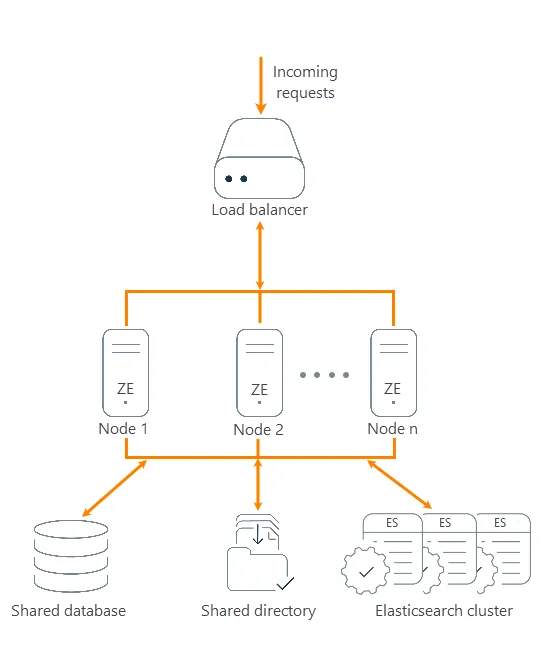
The deployment components include the following:
-
Load Balancer - balances the load across the cluster nodes.
-
Elasticsearch – a search engine deployed on the server node as a micro service or as a separate process in the virtual private network.
-
Shared database – a shared database used by the nodes. Zephyr supports MySQL, MS SQL Server, and Oracle Database.
-
Shared directory – a shared folder where attachments are stored. In a cluster environment, this folder must be shared with write permissions. Network-attached storage (NAS) and similar devices are supported.
It is recommended to have this clustered deployment behind a firewall.
Recommended Configurations
The deployment components may vary depending on the number of concurrent users who will work with Zephyr Data Center. There are three recommended configurations:
Configuration 1: Up to 100 concurrent users
| Component | Number of Nodes | vCPU | System Memory | Application Memory | Storage |
|---|---|---|---|---|---|
| Application | 1 (single node) | 4 | 16 GB | 8 GB | 350 GB* |
| Elasticsearch | |||||
| Database |
* Depending on the database size.
Configuration 2: 100 - 500 concurrent users
| Component | Number of Nodes | vCPU | System Memory | Application Memory | Storage |
|---|---|---|---|---|---|
| Application | 2 | 4 | 16 GB | Min: 8GB Max: 12GB |
350 GB |
| Elasticsearch | 1 | 4 | 16 GB | 8 GB | 350 GB |
| Database | 1 | 8 | 16 GB | 16 GB | 350 GB* |
| Load Balancer | A load balancer to distribute load among the application nodes | ||||
| Shared Storage |
Shared among the application nodes to store attachment files for Requirements, Test Cases and Executions |
* Depending on the database size.
Configuration 3: 500 - 1500 concurrent users.
Recommended OS: Linux
| Component | Number of Nodes | vCPU | System Memory | Application Memory | Storage |
|---|---|---|---|---|---|
| Application | 4 | Min: 4 Recommended: 8 |
16 GB | Min: 8 GB Max: 12GB |
350 GB |
| Elasticsearch | 3 | 4 | 16 GB | 8 GB | 350 GB |
| Database | 1 | Min: 16 Recommended: 32 |
32 GB | 16 GB | 350 GB* |
| Load Balancer | A load balancer to distribute load among the application nodes | ||||
| Shared Storage |
Shared among the application nodes to store attachment files for Requirements, Test Cases and Executions |
* Depending on the database size.
-
System Memory is the total memory allocated to the virtual machine.
-
Application Memory is the memory allocated to the respective applications running on the machine.
Requirements
-
See JVM allocation.
-
The same Java version must be installed on all the nodes.
-
The same time zone must be set on all the nodes, and the current time must be synchronized (use the Network Time Protocol daemon (ntpd) or a similar service).
Installation procedure
To install Zephyr Enterprise on cluster nodes, you need to perform the following steps: