
Troubleshoot
Error 1:
If Zephyr fails to launch on the browser and you get the following error:
HTTP Status 501 Not Implemented
Type Status report
Message Method [tok] is not implemented by the Servlet for this URI
Solution:
While upgrading to Zephyr Enterprise 7.18.0 version, if you are using any monitoring tool integrated with Zephyr, you need to remove the settings.
You must follow the steps below:
For Linux
-
In ZE, navigate to setenv.sh in the {ZephyrDir}/tomcat/bin folder.
-
Open the setenv.sh file in any editor and confirm if the below line is present in the file.
Delete lines other than those present in the file.
export JAVA_HOME=/usr/java/jdk17.0.16
export CATALINA_PID=/home/zephyr/zephyr/bin/zephyr.pid
export JAVA_OPTS="-server -Xms2048m -Xmx4096m -XX:MaxMetaspaceSize=512m Dorg.terracotta.quartz.skipUpdateCheck=true -Djava.awt.headless=true"
For Windows
-
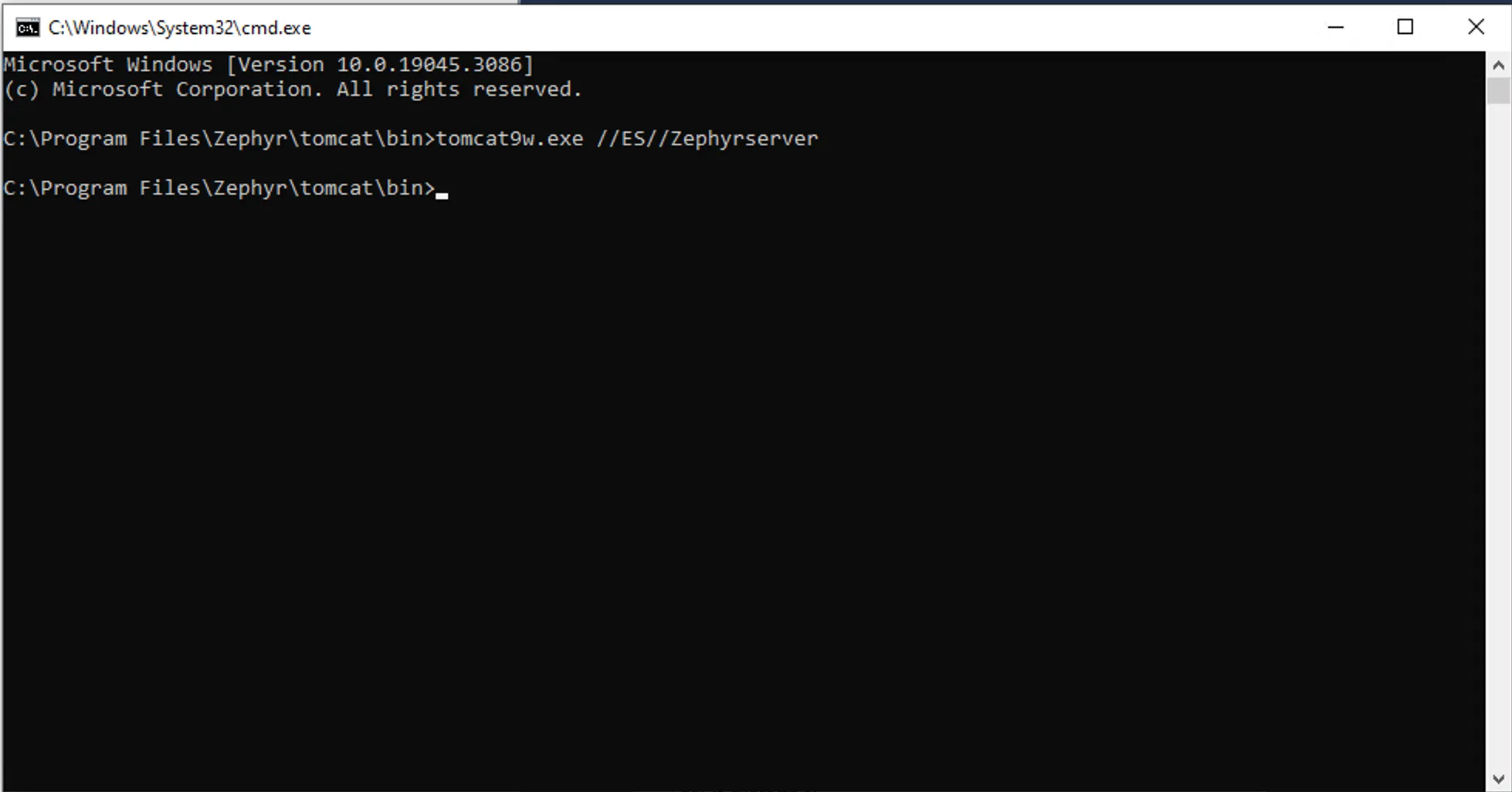
Open the command prompt.
-
Navigate to the location where Zephyr is installed {ZephyrDir}\tomcat\bin
-
Type the command:
_**tomcat9w.exe //ES//Zephyrserver**_ -
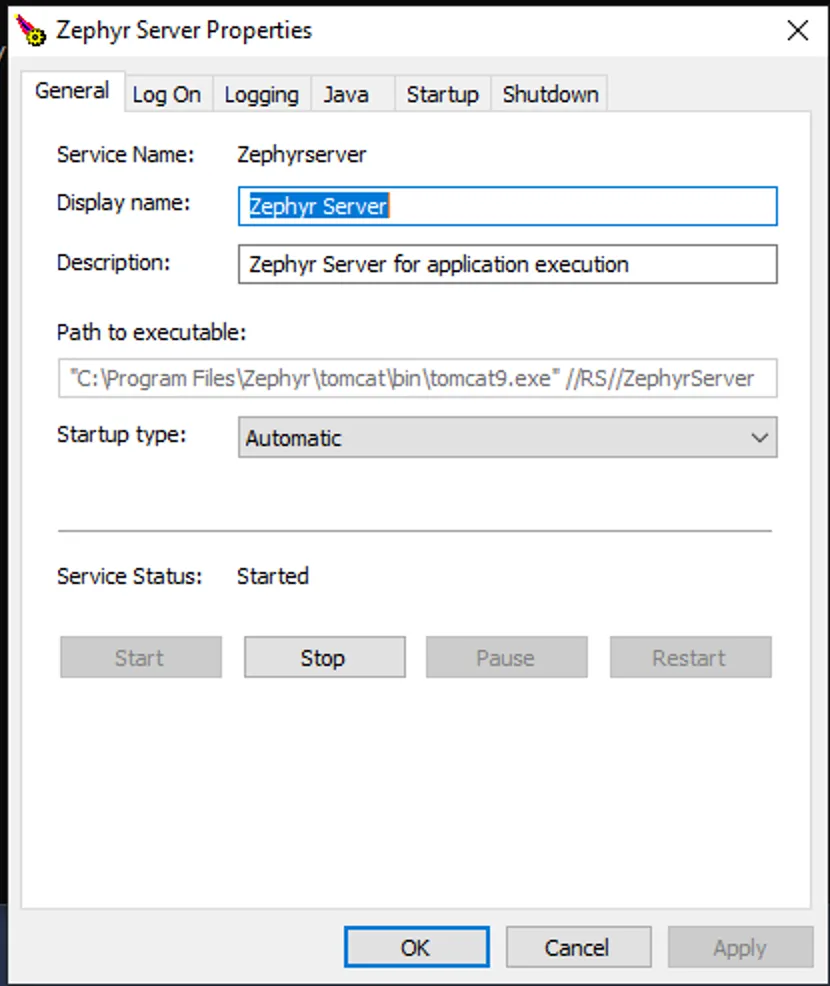
The Zephyr Server Properties open.
-
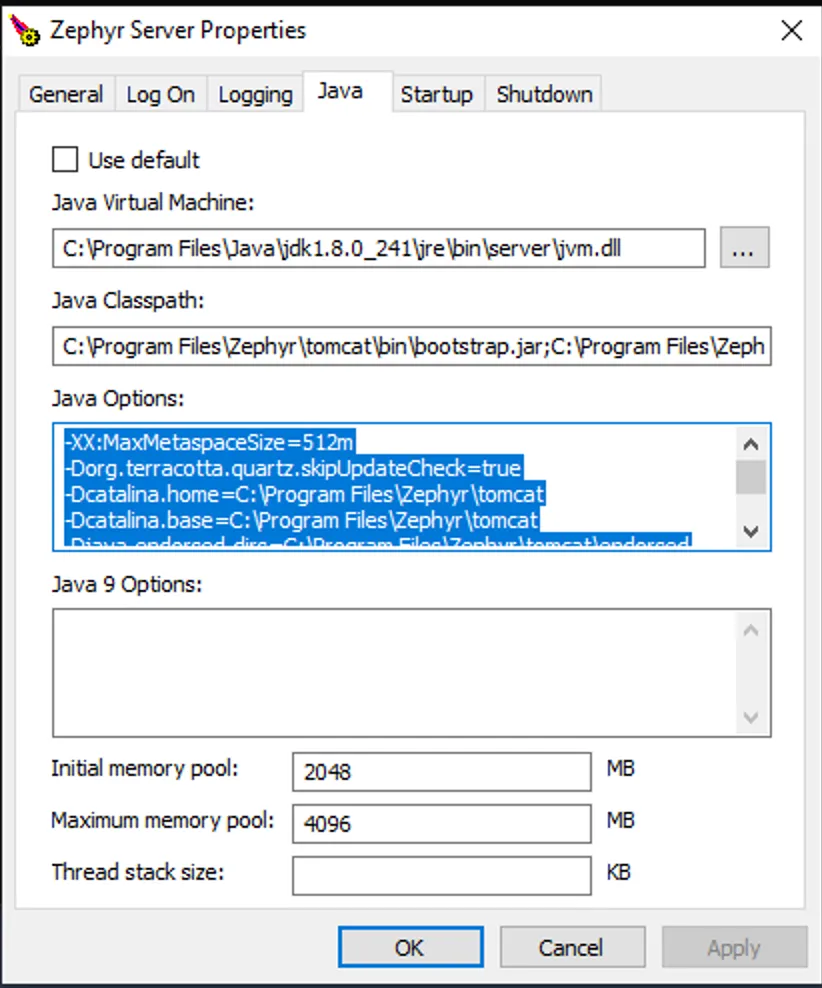
Navigate to Java option in the Zephyr Server Properties.
-
In the Java Options, confirm if the following lines are present in the file.
Delete lines other than these lines present in the file.:
-XX:MaxMetaspaceSize=512m -Dorg.terracotta.quartz.skipUpdateCheck=true -Dcatalina.home=C:\Program Files\Zephyr\tomcat -Dcatalina.base=C:\Program Files\Zephyr\tomcat -Djava.endorsed.dirs=C:\Program Files\Zephyr\tomcat\endorsed -Djava.io.tmpdir=C:\Program Files\Zephyr\tomcat\temp -Djava.util.logging.manager=org.apache.juli.ClassLoaderLogManager -Djava.util.logging.config.file=C:\Program Files\Zephyr\tomcat\conf\logging.properties -
Click Ok and then Apply.
Error 2:
In Linux, when changing the ownership from Root to Non-root, if Zephyr fails to launch on the browser and you get the following error in the catalina.log file:
29-Aug-2023 11:42:58.073 INFO [main] org.apache.coyote.AbstractProtocol.init Initializing ProtocolHandler ["http-nio-80"]
29-Aug-2023 11:42:58.099 SEVERE [main] org.apache.catalina.util.LifecycleBase.handleSubClassException Failed to initialize component [Connector[HTTP/1.1-80]]
        org.apache.catalina.LifecycleException: Protocol handler initialization failed
                at org.apache.catalina.connector.Connector.initInternal(Connector.java:1011)
                at org.apache.catalina.util.LifecycleBase.init(LifecycleBase.java:136)
                at org.apache.catalina.core.StandardService.initInternal(StandardService.java:549)
                at org.apache.catalina.util.LifecycleBase.init(LifecycleBase.java:136)
                at org.apache.catalina.core.StandardServer.initInternal(StandardServer.java:1041)
                at org.apache.catalina.util.LifecycleBase.init(LifecycleBase.java:136)
                at org.apache.catalina.startup.Catalina.load(Catalina.java:724)
                at org.apache.catalina.startup.Catalina.load(Catalina.java:746)
                at sun.reflect.NativeMethodAccessorImpl.invoke0(Native Method)
                at sun.reflect.NativeMethodAccessorImpl.invoke(NativeMethodAccessorImpl.java:62)
                at sun.reflect.DelegatingMethodAccessorImpl.invoke(DelegatingMethodAccessorImpl.java:43)
                at java.lang.reflect.Method.invoke(Method.java:498)
                at org.apache.catalina.startup.Bootstrap.load(Bootstrap.java:307)
                at org.apache.catalina.startup.Bootstrap.main(Bootstrap.java:477)
        Caused by: java.net.SocketException: Permission denied
                at sun.nio.ch.Net.bind0(Native Method)
                at sun.nio.ch.Net.bind(Net.java:461)
                at sun.nio.ch.Net.bind(Net.java:453)
                at sun.nio.ch.ServerSocketChannelImpl.bind(ServerSocketChannelImpl.java:222)
                at org.apache.tomcat.util.net.NioEndpoint.initServerSocket(NioEndpoint.java:276)
                at org.apache.tomcat.util.net.NioEndpoint.bind(NioEndpoint.java:231)
                at org.apache.tomcat.util.net.AbstractEndpoint.bindWithCleanup(AbstractEndpoint.java:1317)
                at org.apache.tomcat.util.net.AbstractEndpoint.init(AbstractEndpoint.java:1330)
                at org.apache.coyote.AbstractProtocol.init(AbstractProtocol.java:652)
                at org.apache.coyote.http11.AbstractHttp11Protocol.init(AbstractHttp11Protocol.java:75)
                at org.apache.catalina.connector.Connector.initInternal(Connector.java:1009)
                ... 13 more
Solution:
You need to check the port in server.xml file.
You must change the port in the server.xml file from 80 to 1024 and above.
Error 3:
If upgrade to Zephyr Enterprise v7.19.0 is taking longer than expected?
OR
If during upgrade to Zephyr Enterprise v7.19.0, you encounter an error?
Solution:
If you experience an extended upgrade duration or encounter the patch_0176 failed due to The total number of locks exceeds the lock table size error, follow these steps:
-
Extended Upgrade Time: Be prepared for longer upgrade times, especially with extensive historical data due to the introduction of patch_0176.
-
Downtime Planning: Anticipate potential downtime and plan accordingly to minimize disruptions during the upgrade.
-
Error Resolution: In case of the “lock table size” error, review the MySQL settings and consider adjusting the innodb_buffer_pool_size configuration as needed.
If you require further assistance or encounter additional issues, we encourage you to contact our support team for resolution.