Download API Definitions from Swagger Studio
Swagger Studio lets you download the API definition of any API or domain in the YAML or JSON format.
Tip
This topic references the following terms:
Local
$ref: A$reflink to a component in the same API definition.External
$ref: A$reflink to another definition file or component, for example, a domain.Flatten: To move all inline schemas into
#/componentsand create local$reflinks.
Download from Swagger Studio Editor
Open the API in the Swagger Studio editor.
If the API has several versions, select the version you want to download.
On the Export menu, select Download API, and then select the format, YAML or JSON.
There are options to download either a resolved or an unresolved definition. This makes a difference if your definition includes external $ref links, such as links to domains.
Unresolved means external
$reflinks are not resolved, and the resulting file contains the$reflinks as they appear in the editor.Resolved means external
$reflinks are resolved, that is, the contents of external files are included in the resulting definition. For OpenAPI 2.0 and 3.0 definitions, you can also choose whether the resolved definition is flattened:Flattened moves all inline schemas, including the schemas pulled in from external
$reflinks, into#/components, and replaces each of them with a local$reflink. The result contains only named, reusable schemas.Non-flattened keeps the structure of the definition as is. External
$reflinks are replaced with the referenced content inline, and existing inline schemas stay where they are defined.
Note
The flattened and unflattened options are available only for OpenAPI 2.0 and 3.0 definitions. Resolved definitions downloaded from the editor were always flattened before this option was introduced. If your tools or pipelines depend on that structure, select the flattened option.
Download via a URL
Public APIs
A quick way to download API definitions from Swagger Studio is to replace app with api in the address bar, as shown below.
Remove that part if the URL ends with a permalink to a tag or operation, such as #/pets
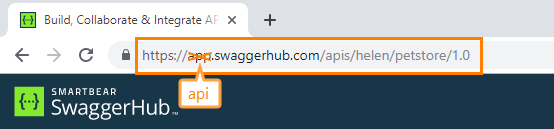
In Swagger Studio On-Premise, add /v1 after the host name instead.
The download URL has the following format:
https://api.swaggerhub.com/apis/{owner}/{api}/{version}         # Swagger Studio SaaS
http(s)://{swaggerhub-host}/v1/apis/{owner}/{api}/{version}     # Swagger Studio On-Premise
You can also use tools like cURL to download definitions from Swagger Studio:
curl https://api.swaggerhub.com/apis/swagger-tutorials/petstore/1.0.0
This downloads the API definition as JSON. If you want YAML, either append /swagger.yaml at the end, or use the Accept: application/yaml header:
curl https://api.swaggerhub.com/apis/swagger-tutorials/petstore/1.0.0/swagger.yaml
curl -H "Accept: application/yaml" https://api.swaggerhub.com/apis/swagger-tutorials/petstore/1.0.0
Resolved YAML/JSON
To get a resolved API definition, append ?resolved=true to the download URL.
Resolved YAML:
https://api.swaggerhub.com/apis/{owner}/{api}/{version}/swagger.yaml?resolved=trueResolved JSON:
https://api.swaggerhub.com/apis/{owner}/{api}/{version}?resolved=trueIn Swagger Studio On-Premise:
http(s)://{swaggerhub-host}/v1/apis/{owner}/{api}/{version}/swagger.yaml?resolved=true
http(s)://{swaggerhub-host}/v1/apis/{owner}/{api}/{version}?resolved=true
Note
If your API contains self-referencing schemas, Swagger Studio preserves these unresolved circular references when generating a resolved definition. Resolving APIs with circular $refs may take longer than usual.
Private APIs
If the API definition is private, add the Authorization: API_KEY header containing your Swagger Studio API key:
curl -H "Authorization: API_KEY" https://api.swaggerhub.com/apis/{owner}/{api}/{version}Maven and Gradle plugins
Swagger Studio has plugins for Maven and Gradle that allow you to download API definitions as part of your CI/CD pipeline.