Exporting Markdown Files from Stoplight
Markdown files are stored in an SCM system and are ready to be imported into Swagger Studio.
Export a project
You can export an entire project from the Design Editor (edit mode). The generated file is a snapshot of project contents. Downloading projects resolves $refs in API and JSON schema files. This type of export displays references to component library models in the APIs.
To export a project, perform the following steps:
Select the project to download on the workspace sidebar.
Click Edit.
Select Download project Zip in the menu.
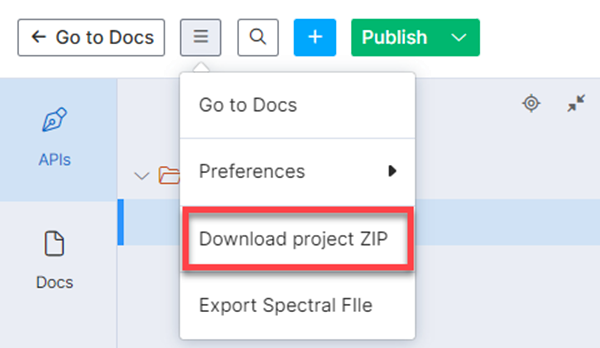
The project downloads as a ZIP file.
Export Markdown files from Stoplight Studio
Perform the following steps to export Markdown files from Stoplight Studio:
Log in to your workspace.
Select a project and click Edit.
Open the Files or Docs tab.
Right-click the MD file and select Export.
Depending on your preferred outcome, click Copy to clipboard or Save to file.
Tip
For more information on exporting projects or files, refer to the Stoplight documentation.