Resource Roles
For an overview of resource sharing and user roles, see: Work with Others.
You can share resources in Swagger Studio with other people. If a resource is:
The number of members you can add to Swagger Studio depends on your plan. To learn more, see the Pricing page.
Roles
You can assign the following roles to organization members in Swagger Studio:
Designer
Consumer
Owner - a designer with organization management privileges. It is necessary to have an Swagger Studio license assigned in SmartBear Admin to become an organization owner.
In SmartBear Admin, you can assign the administrator role to a user. Users don’t need a Swagger Studio license to be administrators. An administrator in SmartBear Admin can also have any role (or no role) assigned in Swagger Studio.
For product management in Portal, go to the User Management section on the Portal documentation.
These roles provide the following privileges:
Privilege | Consumer1 | Designer | Owner | Admin |
|---|---|---|---|---|
Management | ||||
Invite or remove members to/from organizations | ✓ | |||
Assign user roles | ✓ | ✓ | ||
Manage an organization's plan and licenses | ✓ | |||
Edit organization's | ✓ | ✓ | ||
Resources | ||||
View APIs and domains | ✓ | ✓ | ✓ | |
Create and edit APIs and domains; add and delete versions, publish/unpublish, rename, compare, and merge | ✓ | ✓ | ||
Create and manage Portal products | ✓ | ✓ | ||
Create, edit and manage API custom templates | ✓ | |||
Transfer resources to another owner, delete resources |
| ✓ | ||
Create projects, assign resources and members to projects | ✓ | ✓ | ||
Docs branding | ✓ | |||
Standardization rules | ✓ | |||
Code generation | ||||
Generate client and server code 2 | ✓ 2 | ✓ | ||
Configure codegen options | ✓ | ✓ | ||
Integrations | ||||
Add, manage and trigger integrations | ✓ | ✓ | ||
Working with Others | ||||
Manage sharing | ✓ | ✓ | ✓ | |
Create, delete, manage teams | ✓ | ✓ | ||
Comments (OpenAPI only) | ||||
View, add, reply, edit, resolve, delete, reopen comments | ✓ 3 | ✓ | ✓ |
1 Organization members get commenting permissions automatically if the Allow Consumers to Comment on all the APIs & Domains, they can access option is enabled for the organization. They can also view the Portal Products.
2 API owners and designers can limit the client and server generators available to individual APIs.
3 Consumers can resolve, edit, delete, and reopen only their own comments.
Share resources with members and teams
Designers can invite individuals or teams to view or collaborate on APIs and Domains or remove their resource access.
Open your API or domain page.
In the top right corner, click
 Share:
To add members, enter a user name or team name you want to add, and select a role for each.
To remove a user, click Remove next to their name.
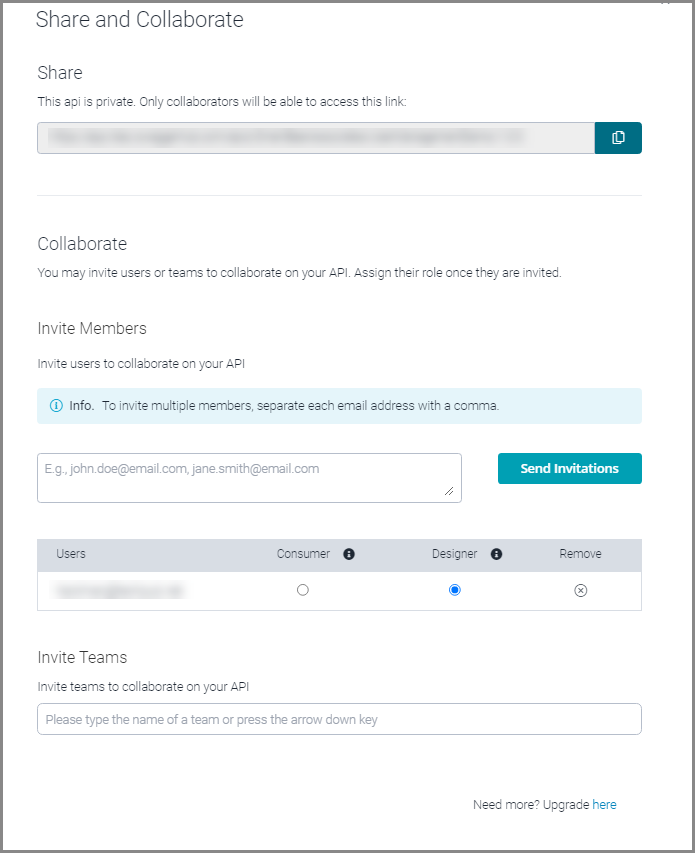
Newly invited users receive an email notification.
Email notifications
Each user with access to a resource gets an email notification when:
They are invited to share the resource
A comment is added, replied to, resolved, or reopened
A version of the resource is published, unpublished, or deleted
Note
Saving the API in the editor does not trigger notifications. Additionally, notifications are not sent to the user who has triggered them.
Concurrent editing
Multiple users can edit the same API definition simultaneously. However, saving your changes may overwrite the updates that others have made. To prevent data loss while editing, Swagger Studio displays a warning every time someone saves their changes to the definition.
Swagger Studio warns you before saving your changes if someone changed the API definition while you were editing it.
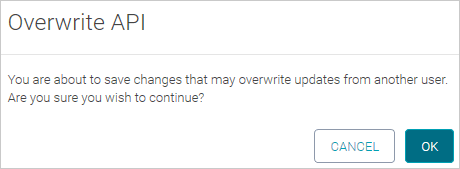
To avoid data loss in this case, we recommend saving your API to a file and then merging it with the API stored in Swagger Studio. You can merge specifications using the Swagger Studio Compare and Merge feature or an external merge tool.
Also, we recommend that you use comments to coordinate your work with other users.