Transferring API Ownership
You can transfer APIs to other organizations in Swagger Studio. This operation cannot be reversed unless the new owner has goodwill to return the ownership to the former owner.
Permissions required to transfer ownership
Transfer direction | Permissions required |
|---|---|
From an organization | Organization Owner or Designer on this API |
To an organization | Organization Owner or Designer |
Transfer ownership
Open the API in the Swagger Studio editor.
Click the API name. This will open the API Info panel.
Click
 Manage Owner & Project.
Select the organization that you want to transfer the API to.
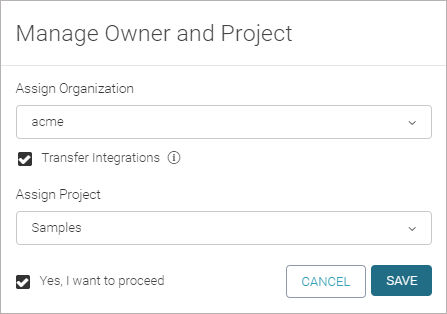
If the API has integrations configured, you can select the Transfer Integrations check box to transfer the API along with the integrations. Note: This will give the new owner access to the integration settings, including access tokens.
(Optional.) Select a project to add this API to. The list contains existing projects that you are a member of.
Select the Yes, I want to proceed check box.
Click Save.