
Overview of ZEE Password Policies and Examples
Zephyr Introduced Xero Password Policy which has a set of 4 password policies to provide more security over the network.
Polices: Default, Weak, Strong, Very Strong
Here is an overview of all the available password policies.
Default :
This password policy requires minimum of 4 characters of any style.
Example : pswd
Weak :
This policy requires password to have minimum of 6 characters with at least 1 uppercase letter and 1 number
Eample : Pasw0d
Strong :
This policy requires password to have minimum of 8 characters with at least 1 lowercase letter, 1 uppercase letter, 1 number, and 1 special character out of ~!@#$%^&*()_-+{}[]<>?/|:;.
Example : Pa$sw@r6!
Very Strong :
This policy requires password to have minimum of 10 characters with at least 2 lowercase letters, 2 uppercase letters, 2 numbers, and 2 special characters out of ~!@#$%^&*()_-+{}[]<>?/|:;.
Example : P@ssW0r6!#
Note : Zephyr recommends strong or very strong policy.
Usage
To set any password policy for your instance, navigate to Administrator -> user Auth -> Password Policy. Select the required Password policy from the drop down and save it.
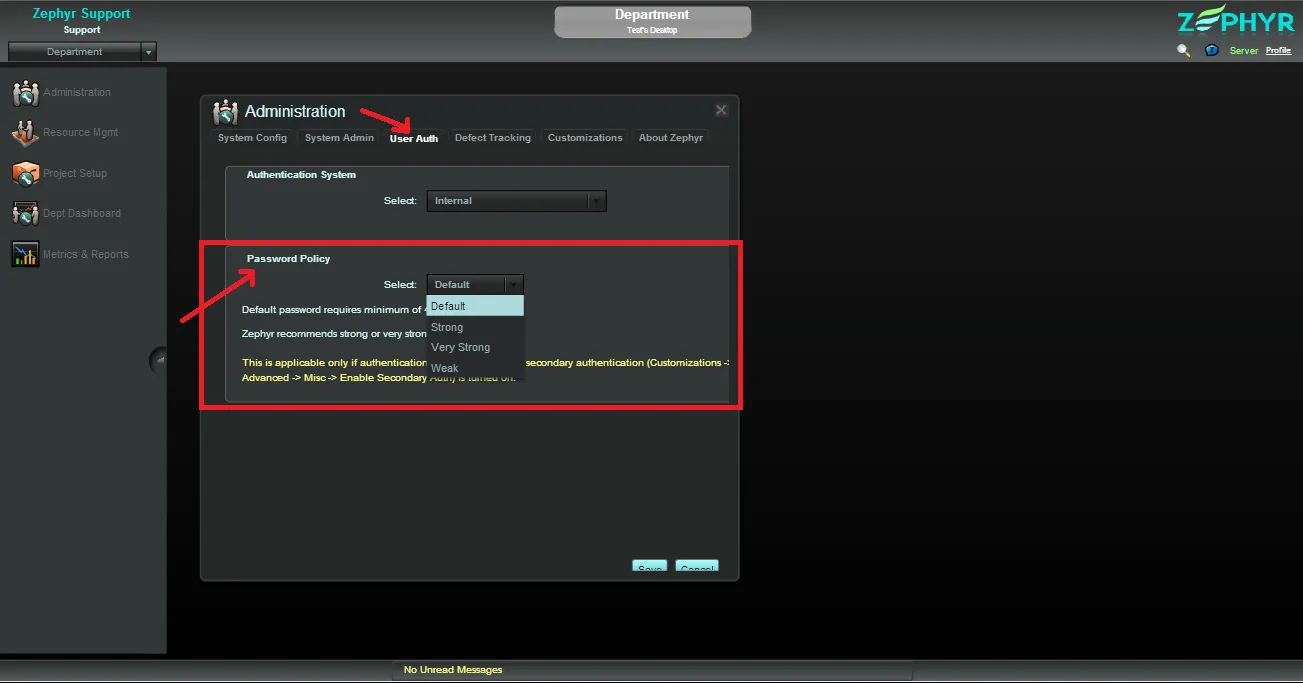
Please note password policy is only applicable when the Authentication system is set to Internal.