
Enabling the App
To enable Zephyr for your space, you must either be a site admin or a space admin.
-
Navigate to a Jira space where you would like to start using Zephyr.
-
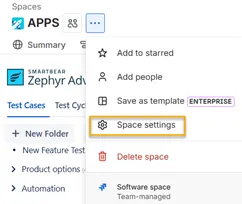
Go to Space Settings.
-
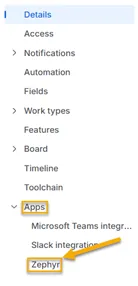
Select Zephyr, under the Apps section.
-
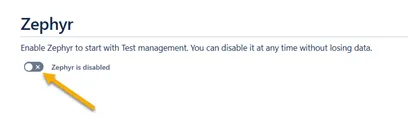
Enable Zephyr in the space using the toggle.
-
Use the Open Application button to navigate to Zephyr.
Next Steps
Already have test cases? Learn more about the Test Case Import.
Please note, the following content is for the new experience of Zephyr Cloud. For documentation on the legacy experience of Zephyr Squad Cloud, please visit thelegacy Zephyr Squad Cloud docs. If you are unsure of your version, check the guide orcontact our support team.