ZFJCloud : Test Details section is missing.
Problem
Test Details in the test issue page is not visible.
Cause
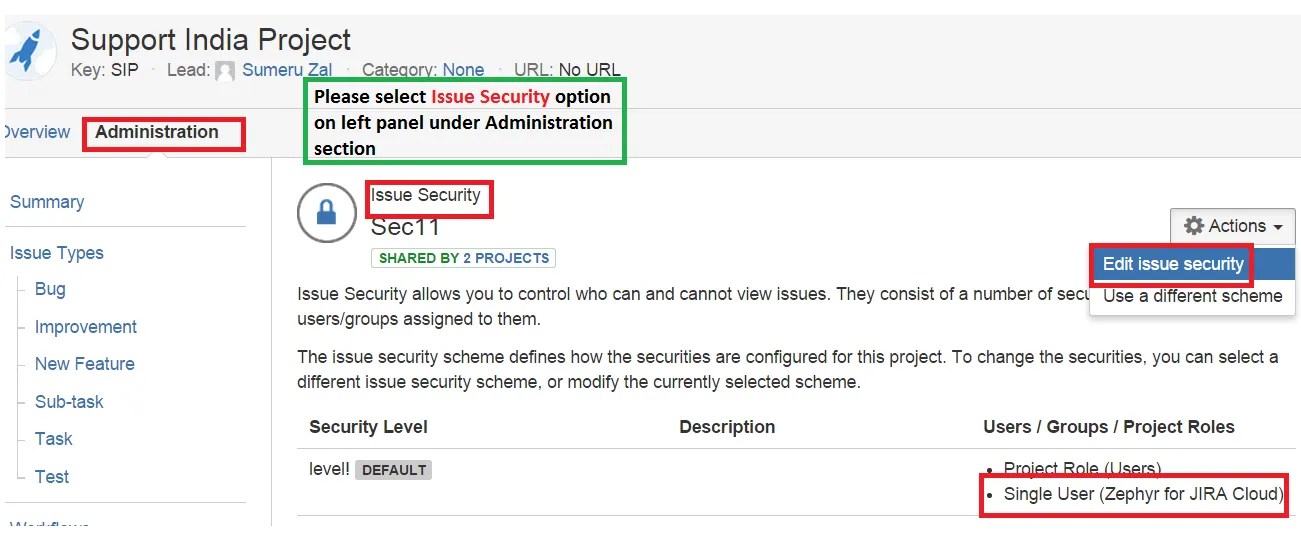
Zephyr for JIRA Cloud user is not added under the issue security level.
Fix
Steps to add the Zephyr for JIRA Cloud user to issue security level-
- Login into JIRA as an administrator.
- Select the project for which you have added the Issue Security Level.
- Click on Administration->Issue Security.
- In Issue security page, add the ‘Zephyr for JIRA Cloud’ user under Users/Groups/Project Roles by Editing security level.