Provider Testing Guide
Principles
Testing the provider API is your responsibility. Contract Testing ensures the specification is compatible with any consumers
Garbage in, Garbage out - Contract Testing trusts any provider contract provided. This is true, whether it has been tested or not.
When using the BYO functional API testing strategy, you must ensure your API is compatible with (and ideally, implements) any specification.
Code-based approaches are generally preferred because they are less likely to drift from implementation. For example, using tools that generate OAS definitions from code/types is more reliable.
When supported, test-based approaches such as ReadyAPI Functional test suites/postman collections, may also be more reliable, as they have embedded testing information in them. Uploading only the tested parts of the provider contract to Swagger Contract Testing improves the guarantees we can provide.
Writing Provider Contracts
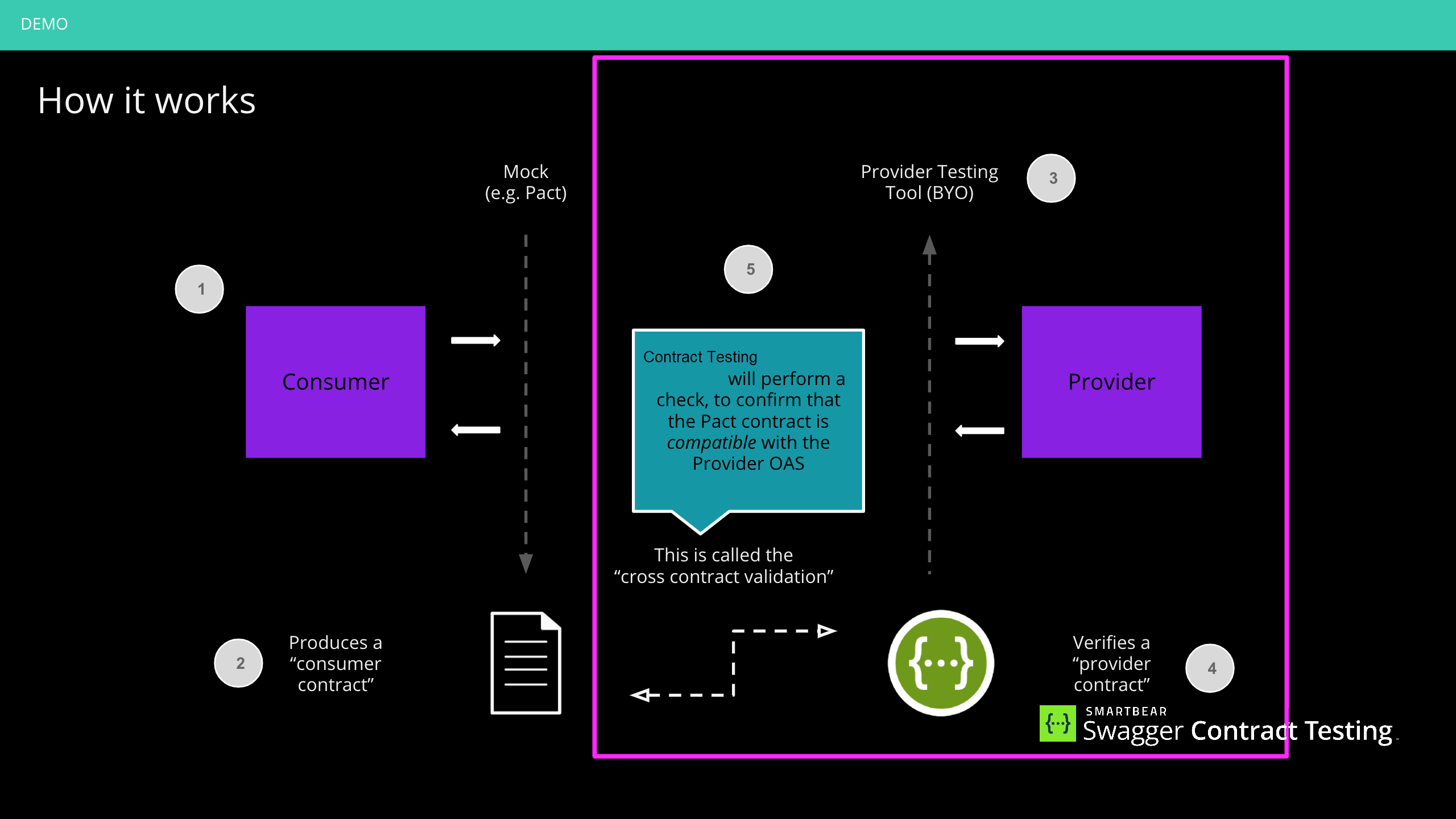
Step 1: Authoring or generating your API definition
You must have, or be able to produce, an API definition in one of the following specification versions:
OpenAPI Specification (OAS) v2.0 (for HTTP APIs)
OAS v3.0.x (for HTTP APIs)
OAS v3.1.x (for HTTP APIs)
AsyncAPI 3.0 or 3.1 (for event-driven APIs)
Step 2: Choose an API testing tool
We recommend Drift, which tests your API directly against its definition and publishes the verification results to Contract Testing. Drift works with both OpenAPI (HTTP APIs) and AsyncAPI (event-driven APIs) provider contracts.
If you have existing tooling, you can continue to use it. There are many tools available: you may want to choose a black-box style functional API testing tool like ReadyAPI, SoapUI, Dredd, or Postman, or white-box style tools such as RestAssured or Supertest.
The key consideration is ensuring your API is compatible with your definition (OpenAPI for HTTP APIs, AsyncAPI for event-driven APIs).
Step 3: Verifying the Provider Contract (Testing your API)
Configure your CI pipeline to run these tests on every change. We suggest running these tests against a locally running server so that you have control and therefore determinism in your tests.
Running against a dedicated testing environment will likely result in flaky tests.
Step 4: Publish your Provider Contract and verification results
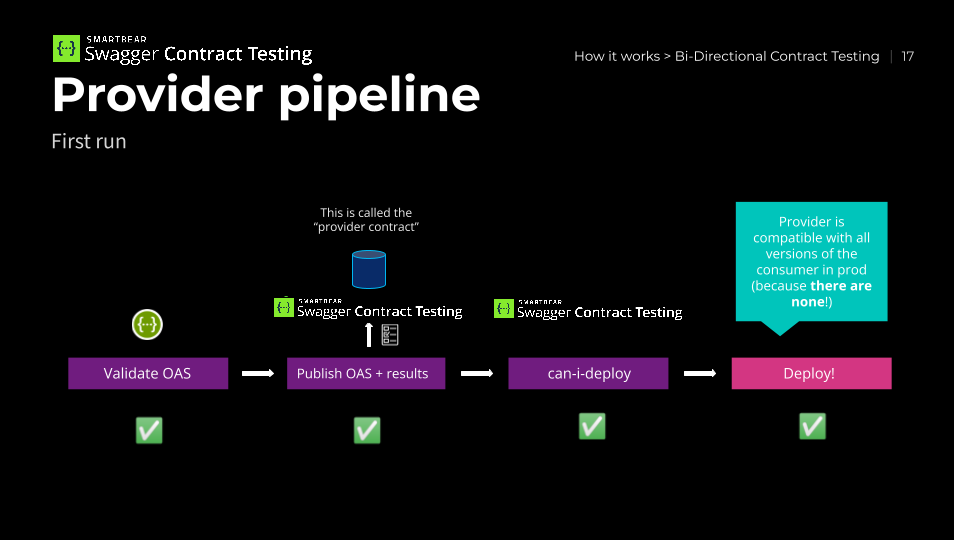
After your tests have completed (pass/fail), you should upload the specification and results to Contract Testing.
See publishing your OpenAPI Provider Contract to Contract Testing for details and examples.
Step 4: Run can-i-deploy
can-i-deploy gives you immediate feedback if you are safe to release a version of an application to a specified environment (such as production).
We recommend using the pact-broker can-i-deploy command from CLI Tools for this step.
Our examples use the Docker version to simplify administration.
The command output will provide a link to the verification results in Contract Testing. Interpreting these results is contract specific.
Here is our pipeline to date for the first run of a provider:
Step 5: Deploy your application
If can-i-deploy returns a successful response, you can deploy your application.
Once your application is deployed, you can notify Contract Testing of the release - we recommend setting the branch property when you publish provider contracts and use record-deployment or record-release when you deploy/release.
Our examples use the Docker version to simplify administration.
Golden rule of deployments:
The Pact Broker needs to know which versions of each application are in each environment. So, it can return the correct contracts for verification and determine whether a particular application version is safe to deploy.
record-deploymentautomatically marks the previously deployed version as undeployed and is used for APIs and consumer applications deployed to known instances.record-releasedoes NOT change the status of any previously released version and is used for mobile applications and libraries made publicly available via an application store or repository.
Event-Driven Providers
If your service publishes or consumes messages through event-driven APIs, use an AsyncAPI 3.0 or 3.1 definition as your provider contract instead of an OpenAPI definition. A provider publishes one provider contract — either an OpenAPI definition or an AsyncAPI definition, not both.
Publishing your AsyncAPI contract:
Upload your AsyncAPI definition using pactflow publish-provider-contract:
pactflow publish-provider-contract ./asyncapi.yaml \
  --provider MyEventService \
  --provider-app-version ${GIT_COMMIT} \
  --branch ${GIT_BRANCH} \
  --content-type application/yaml \
  --specification asyncapi \
  --verification-success \
  --verification-results ./results.txt \
  --verification-results-content-type text/plain \
  --verifier "my-verification-tool"
Key flags for AsyncAPI publishing:
--specification asyncapi- tells Contract Testing this is an AsyncAPI definition (when omitted, the specification defaults tooas)--content-type application/yaml- useapplication/jsonif your definition is in JSON format--verifier "my-verification-tool"- the name of the tool you used to verify your implementation (for example,driftwhen using Drift)
See Publishing Contracts for all supported publishing methods (Docker, standalone CLI, Ruby gem, GitHub Actions).
Verifying your implementation against your AsyncAPI definition:
Before publishing, verify that your implementation matches its AsyncAPI definition. We recommend Drift for this. You can also use your own verification tooling - pass its name via the --verifier flag when publishing.
Verification with message consumers:
Consumers write Pact V4 message tests that reference your AsyncAPI operations by operationId. When you publish your AsyncAPI contract, Contract Testing automatically verifies that your message operations match what consumers expect.
Providers with both HTTP and message consumers:
A provider publishes either an OpenAPI definition or an AsyncAPI definition as its provider contract - not both. If your consumers' contracts also contain interactions of the other type, validate those interactions using Pact provider verification so that every interaction has a verification result.
Checking compatibility before deploying:
Use can-i-deploy to confirm that your AsyncAPI contract is compatible with your consumers' expectations before deploying - the same workflow as HTTP providers. See Deploying and Releasing.
For details on how message comparison works and how to interpret verification results, see Features - Testing AsyncAPI. For consumer test setup, see the Consumer Testing Guide. For a complete working example, visit the pactflow/example-bi-directional-provider-asyncapi repository.
Integrating it into your CI/CD pipeline
A simplified view of a CI/CD pipeline for Pact looks like this:
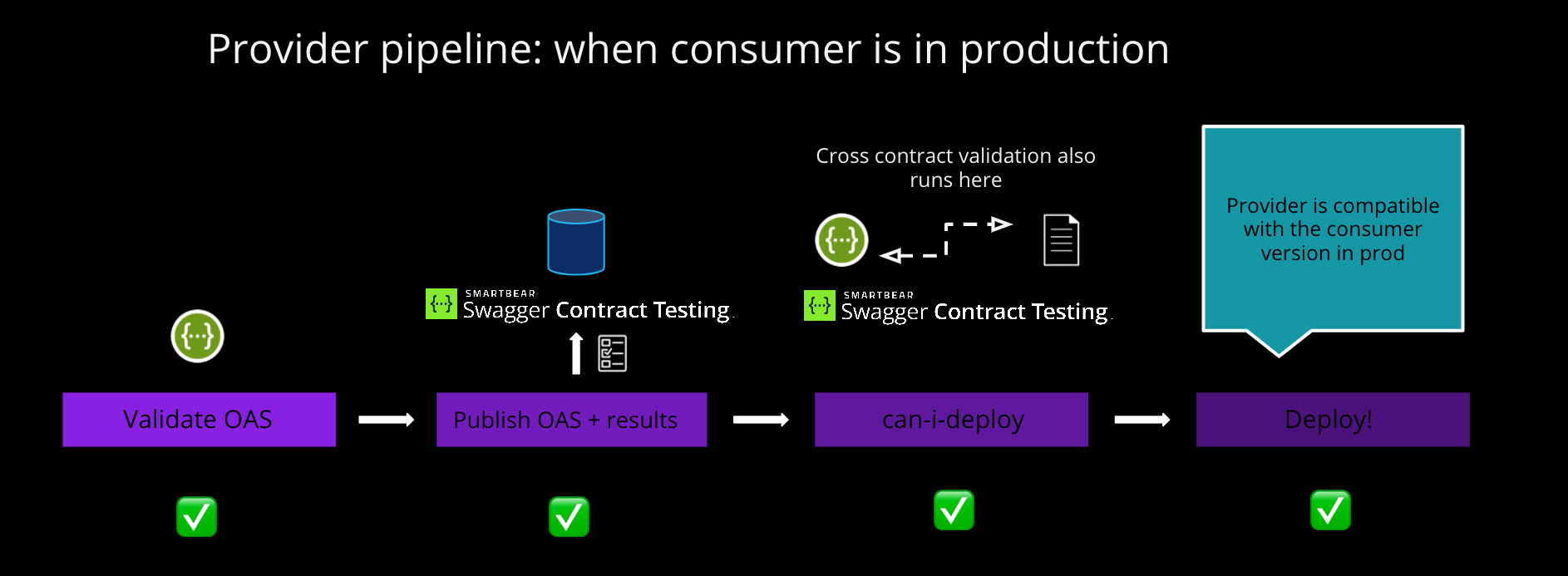
The standard principles are still relevant. Our CI/CD workshop is a useful reference (NOTE: the CI/CD workshop uses the consumer-driven mode using Pact).
Other
Other examples of how to do this form of testing
https://hazelcast.com/blog/contract-first-development-using-restassured-and-openapi/
https://www.openapi4j.org/operation-validator-adapters/spring.html
https://springframework.guru/should-i-use-spring-rest-docs-or-openapi/
https://github.com/OpenAPITools/openapi-generator (generate rest assured tests from spec)