Private Workspaces
Private workspaces help you work with APIs and tests in an isolated space. Only you can see the content in your private workspace.
Use a private workspace when you need to experiment or develop without affecting other users in your organization. Functional Testing provides two space types:
Workspace | Scope | Shared with other users |
|---|---|---|
Organization workspace | Shared space for your organization | Yes |
Private workspace | Your personal space | No |
Note
All items such as APIs, tests, suites, runs, environments, and segments belong to a workspace. Items never mix between spaces.
Start with private workspace
Functional Testing automatically provides a private workspace for each user upon their initial entry. The workspace is available immediately and does not require any setup.
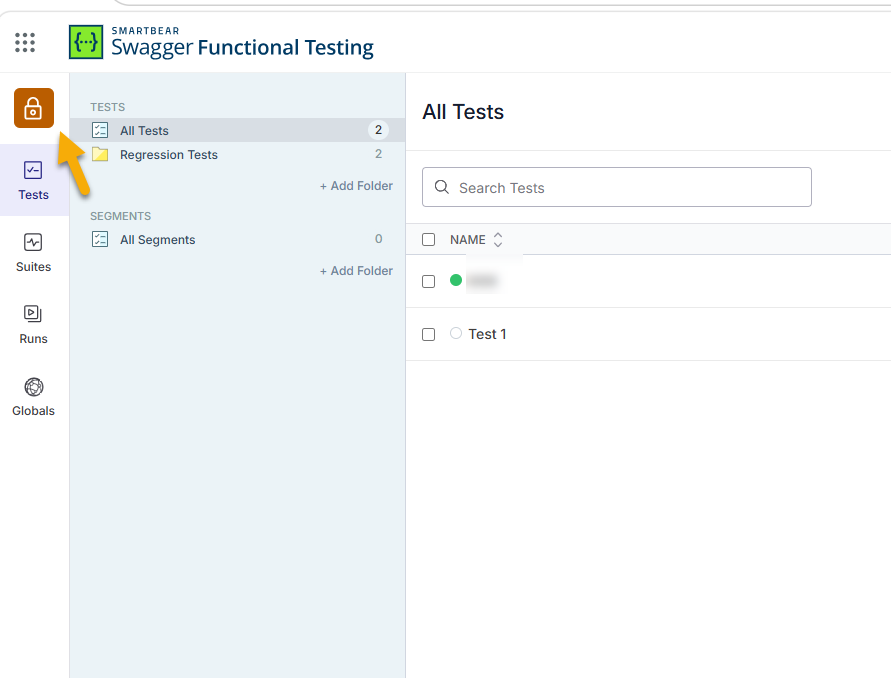
Switch between workspaces
Select Organization Workspace or Private Workspace.
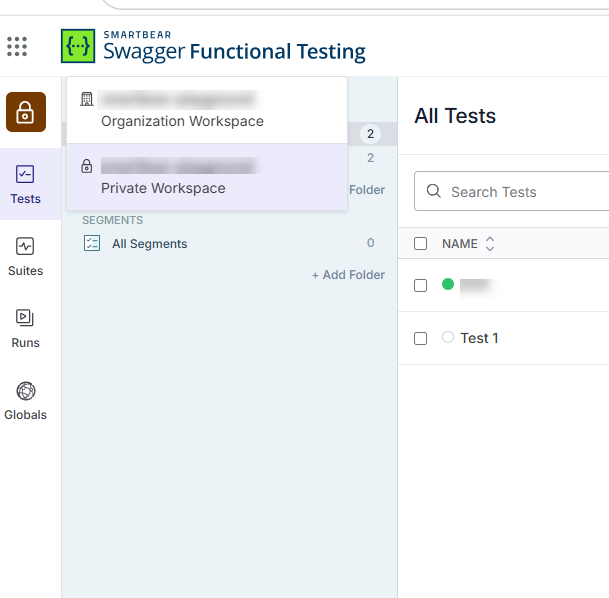
Wait for the page to reload. Functional Testing updates the view automatically.
When to use a private workspace
Use a private workspace when you want to:
Develop tests without affecting the organization workspace.
Keep your APIs, variables, and secrets private.
Try a new version of an API.
What changes when you switch workspace
When you switch between workspaces, the page reloads. After reload, Functional Testing displays only items that belong to the active workspace. You see:
Only folders and tests from the active workspace.
Only runs, suites, and metrics from the active workspace.
Only variables assigned to the active workspace.
Key behaviors
You cannot share private items with the organization workspace.
You cannot use organization-level variables while you are in a private workspace.
Items you create are available only in the active workspace.
Organization administrators cannot access or modify your private workspace content.
Your private workspace is automatically soft deleted when your user account is soft deleted.
Usage and billing
Functional Testing aggregates usage and billing across the parent organization and all private sub-accounts, returning totals only. Individual workspace breakdowns are not available.
Subscription entitlements for test executions and parallelism are shared between the parent organization and all private sub-accounts. Limits and queueing are enforced at the organization level across all workspaces.
For information about user roles, permissions, and organization management, see Account Setup.