Authentication and Authorization
The Authorization tab allows you to configure authentication for a request using reusable authorization profiles. These profiles define how a request is authenticated and can be reused across multiple steps and tests. Learn more about supported authorization types.
Working with Authorization Profiles
Authorization profiles allow you to define credentials once and reuse them across steps.
Open a test step.
Go to the tab.
Select an option from the Authentication type dropdown.
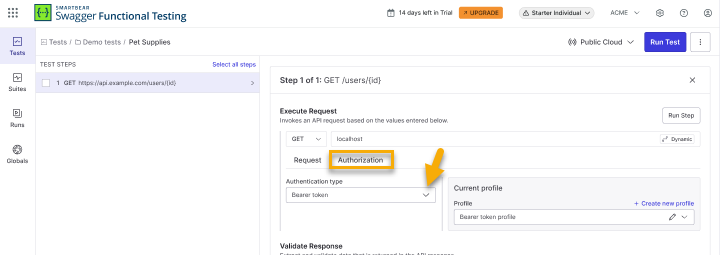
Create a New Profile
In the Current profile section, click Create new profile.
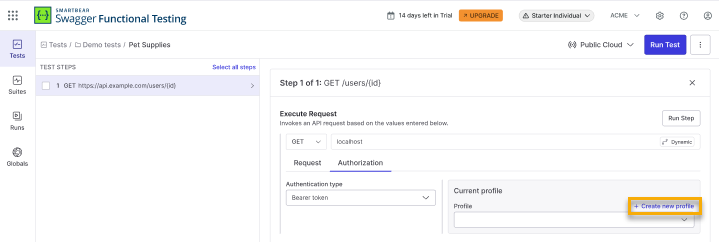
Enter profiles name and credentials based on the selected auth type.
Click Create new profile.
Select a Profile
Use the Current profile dropdown to choose an existing profile.
Note
The list of available profiles is filtered based on the selected Authentication type. For example, if Basic Auth is selected, only profiles created with Basic Auth will be available. Profiles created with other types (such as Bearer Token) will not appear in the list.
The selected profile is applied to the request.
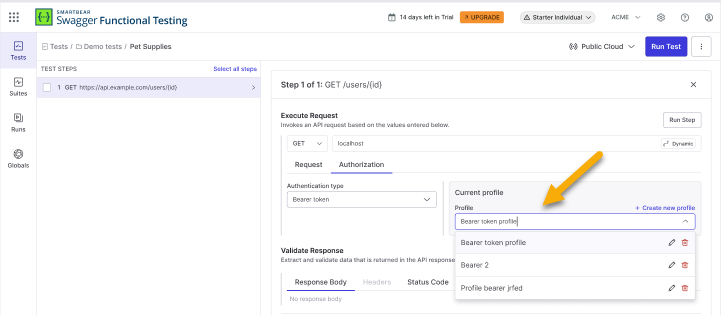
Edit a Profile
Open the profile dropdown.
Click the edit (pencil) icon next to a profile.
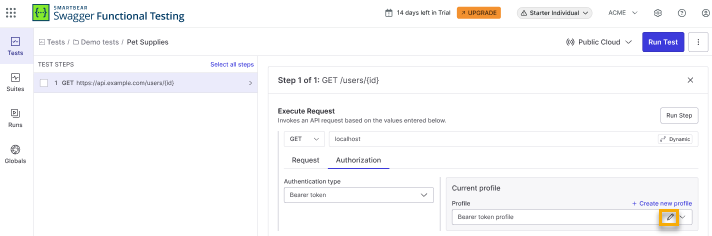
Update fields and click Save changes.
Delete a Profile
Click the delete icon next to a profile.
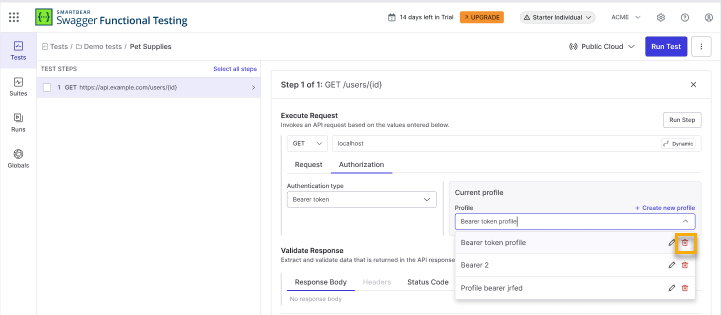
Confirm deletion in the dialog by clicking Delete Profile. Deleting removes the profile from all associated steps.
View Authorization Details
After you select an Authentication type and apply an authorization profile, the authorization data is automatically added to the headers. You can see and review it within the Request tab.
Authorization profiles take precedence over manually defined headers. This means:
Headers generated from the selected profile cannot be overridden manually.
To change authorization values, update the selected profile or choose a different one in the Authorization tab.
If you need to define custom authorization headers, remove the profile and add the headers manually.