Consumer Testing Guide
Principles
It is important for you to use a mock and not a stub. The crucial difference is that a mock validates behaviour, whereas a stub does not. We need to ensure that your consumer code calls the mock, otherwise we will serialise a contract with invalid expectations.
Writing Consumer Contracts
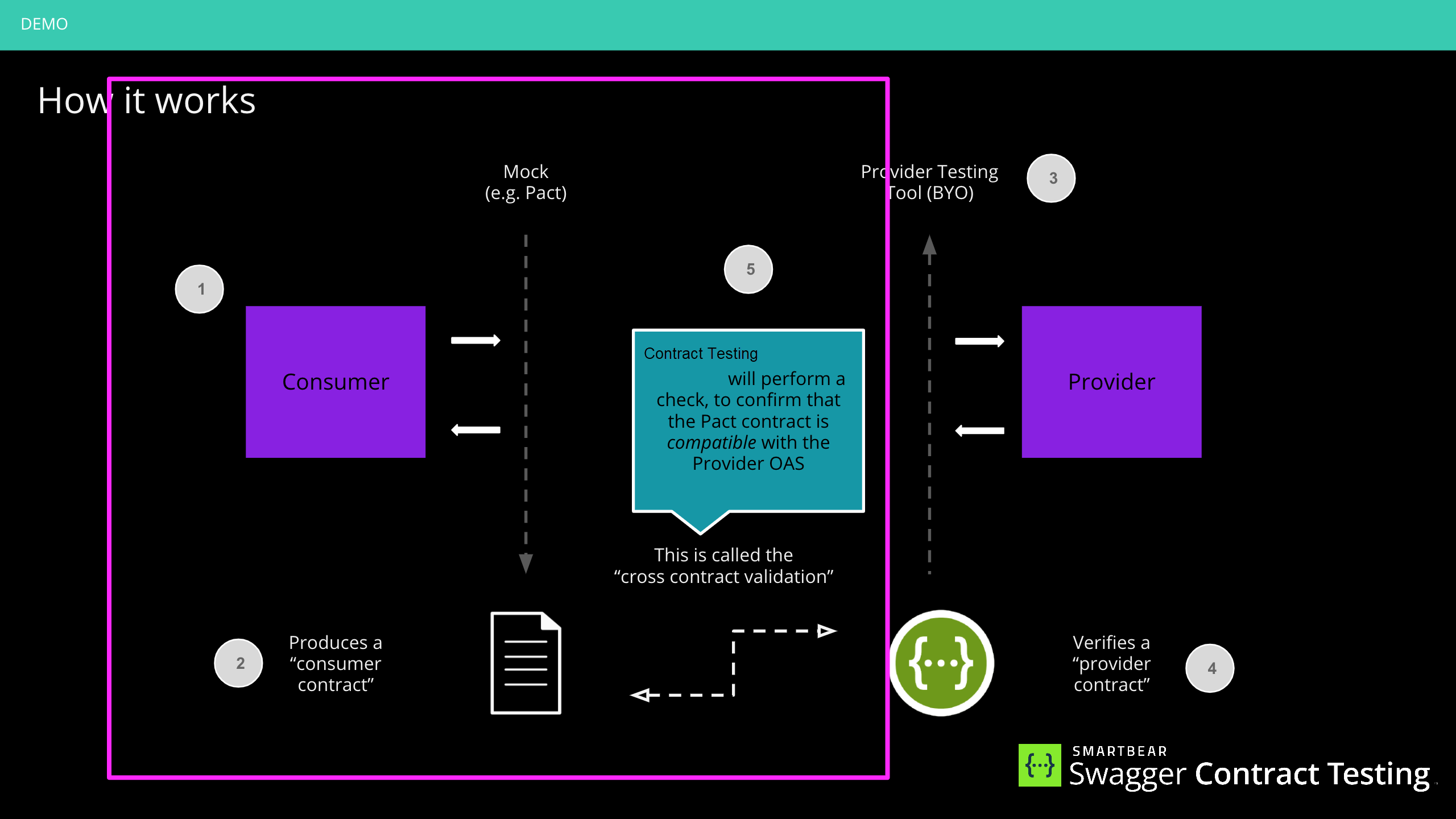
Prerequisite: choose a mocking tool
If you're not using Pact, you need to pick a tool that can extract the mocking information from or use a pre-existing adapter, to convert it to a pact file.
Some tools have options to serialise mocks to files, and others will require you to introspect via their APIs. You should consider this in advance.
Step 1: Write your consumer tests
Once you have chosen your tool, you must implement consumer side tests. It is important that you exercise all the API behaviour your system expects to ensure you have optimal coverage.
One notably deviation from Pact advice is that you need not concern yourself with finding the minimal set of tests for a contract and are free to use mocks for any functional testing. In fact, this is encouraged.
(Reference to standard contract testing advice: https://docs.pact.io/consumer/contract_tests_not_functional_tests/)
Step 2: Convert your mocks (writing the pact adapter)
NOTE: If you chose Pact in Step 1, you could skip to Step 3.
Read the documentation on how to generate a pact contract from your mocks.
Note
We will be building adapters for common mocking tools as we expand this feature. See current community contributed adapters below.
Step 3: Publish your contract
Uploading a pact file is the same as the standard Pact process.
We recommend using the pact-broker publish command from CLI Tools for this step. Our examples use the Docker version to simplify administration.
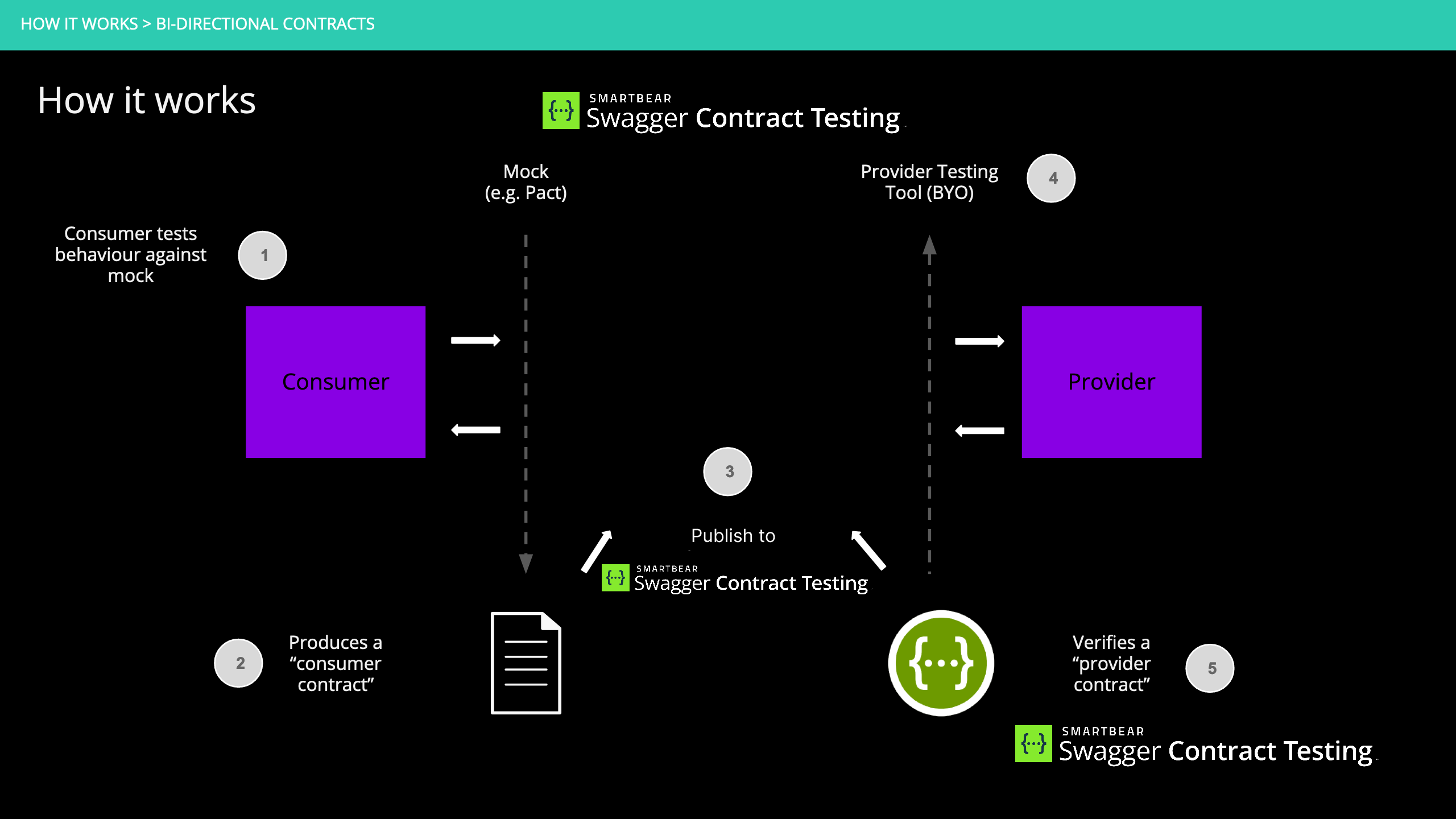
Step 4: Run can-i-deploy
can-i-deploy gives you immediate feedback if you are safe to release a version of an application to a specified environment (such as production).
We recommend using the pact-broker can-i-deploy command from CLI Tools for this step. Our examples use the Docker version to simplify administration.
The command output will provide a link to the verification results in Swagger Contract Testing. Interpreting these results is contract specific.
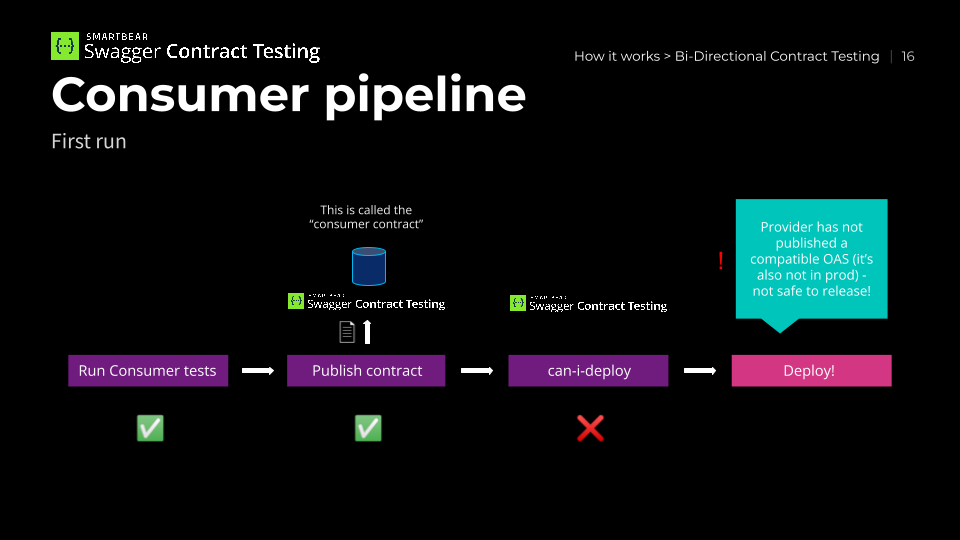
Here is our pipeline to date for the first run of a consumer:
Step 5: Deploy your application
If can-i-deploy returns a successful response, you can deploy your application. Once your application is deployed, you can notify Contract Testing of the release - see the [recording deployments & releases] (https://docs.pact.io/pact_broker/recording_deployments_and_releases) docs
Golden rule:
Associate with the branch name when publishing pacts or verification results and record the deployment or release into any environment.
Event-Driven Consumers
If your service consumes messages from event-driven APIs, use Pact V4 message interactions instead of HTTP mocking. This approach aligns with how your service actually receives messages.
You need the following:
A Pact library with V4 message support. The examples below use Pact JS V4.
The provider must publish an AsyncAPI 3.0 or 3.1 definition as its provider contract. See AsyncAPI.
Fire-and-Forget Messages
In a fire-and-forget pattern, your consumer receives a message and processes it without replying. Use the Asynchronous/Messages interaction type via addAsynchronousInteraction():
typescript
import { PactV4 } from '@pact-foundation/pact/v4';
const provider = new PactV4({
    consumer: 'UserService',
provider: 'EventService',  spec: 4,
});
provider
.addAsynchronousInteraction('receive user signup event')
.withJSONContent({
    userId: '12345',
    email: 'user@example.com',
    timestamp: '2024-01-15T10:00:00Z',
})
.withMetadata({
    contentType: 'application/json',
})
.reference('AsyncAPI', 'operationId', 'receiveUserSignupEvent');
await provider.executeTest(async () => {
// Your consumer code that handles the message
await handleUserSignupEvent({
    userId: '12345',
    email: 'user@example.com',
    timestamp: '2024-01-15T10:00:00Z',
    });
});
When you run this test, Pact generates a consumer contract (pact file) containing the interaction and the AsyncAPI operation reference:
Request/Reply Messages
In a request/reply pattern, your consumer sends a message and expects a response. Use the Synchronous/Messages interaction type via addSynchronousInteraction():
provider
  .addSynchronousInteraction('request user profile and receive response')
  .withRequest('GET', '/profile', {
    body: {
      userId: '12345',
    },
  })
  .withResponse(200, {
    body: {
      userId: '12345',
      name: 'John Doe',
      email: 'john@example.com',
    },
  })
  .withMetadata({
    contentType: 'application/json',
  })
  .reference('AsyncAPI', 'operationId', 'requestUserProfile');

await provider.executeTest(async () => {
  const response = await requestUserProfileAndWaitForReply({
    userId: '12345',
  });
  expect(response.name).toBe('John Doe');
});
The generated pact includes both request and response:
{
  "interactions": [
    {
      "type": "Synchronous/Messages",
      "description": "request user profile and receive response",
      "contents": {
        "request": {
          "body": {
            "userId": "12345"
          }
        },
        "response": {
          "body": {
            "userId": "12345",
            "name": "John Doe",
            "email": "john@example.com"
          }
        }
      },
      "comments": {
        "references": {
          "AsyncAPI": {
            "operationId": "requestUserProfile"
          }
        }
      }
    }
  ]
}
Note
The operationId reference is mandatory. Each interaction must include a reference pointing to the operation in your provider's AsyncAPI definition; without it, verification fails.
Publishing Your Consumer Contract
Publish your consumer contract to Swagger Contract Testing using the standard Pact command:
pact publish ./pacts \
  --consumer-app-version ${GIT_COMMIT} \
  --branch ${GIT_BRANCH}
Contract Testing automatically detects message interactions and compares them against the provider's AsyncAPI definition during verification. See Publishing Contracts for all supported publishing methods, and Features - Testing AsyncAPI for how comparison works and how to interpret verification results.
For working examples using Pact JS V4 and AsyncAPI, visit the pactflow/example-bi-directional-provider-asyncapi repository.
Integrating it into your CI/CD pipeline
A simplified view of a CI/CD pipeline for Pact looks like this:
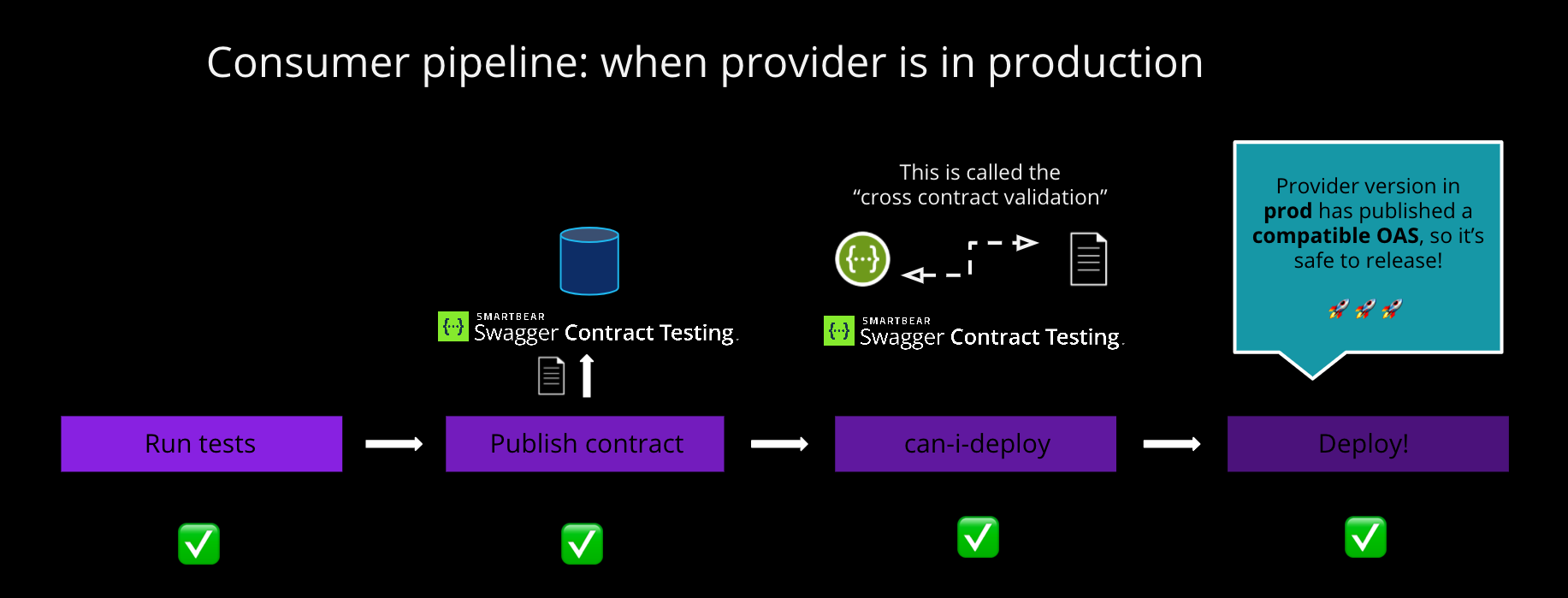
The standard principles are still relevant. Our CI/CD workshop is a useful reference (NOTE: the CI/CD workshop uses consumer-driven mode using Pact).
Community Adapters
All the official and community adapters and guides can be found at tooling integration.