
Versions 2.0 to 2.4
2.4.0 +118 - November 18, 2022
-
Support for creation of API Custom Templates.
-
Support for Enhanced Search.
-
AsyncAPI:
-
Support for AsyncAPI domains.
-
Option to export resolved JSON/YAML added for AsyncAPI definitions.
-
-
Configurable Usage Data Collection option for product improvement insights.
-
Support for Diagnostic/Preflight Checks on Database, Integrations, Certificates, LDAP, SMTP and Web Proxy configuration.
-
The minimum required KOTS version is now 1.85.0. Customers who use an earlier version of KOTS must update the KOTS CLI and Admin Console before upgrading Swagger Studio On-Premise.
-
Component Updates:
-
OpenSSL patches for CVE-2022-3602, CVE-2022-3786 see - Software Quality - SmartBear Software.
-
Updated versions of Swagger-editor (4.4.4), Swagger-ui (4.15.0), Swagger-editor-next (5.0.0-alpha.27);
-
Swagger Studio plugin aligned to new version Intellij IDEA 2022.3;
-
Updated Swagger-Generator-V3 to 3.0.35;
-
Updated Swagger Core to v. 2.2.2 for OpenAPI 3.0
-
2.3.0 +111 - August 22, 2022
- AsyncAPI support added.
2.2.0+106 - June 15, 2022
-
Installation changes:
-
All containers now run as a non-root user.
-
It is no longer required to enable the
anyuidSCC on OpenShift. -
Option to install on OpenShift clusters for users who only have permissions on a single namespace.
-
For embedded installations, the minumum CPU requirements has been reduced from 8 vCPUs to 4 vCPUs.
-
-
Swagger Studio changes:
-
Enable/Disable request validation on API auto-mocking.
-
Improved error messaging when resolved YAML or JSON cannot be generated.
-
New supported regions in AWS integrations: ap-southeast-3 and ap-northeast-3.
-
Updated Swagger UI to v. 4.11.0.
-
Updated Swagger Editor to v. 4.2.7.
-
Updated Swagger Client to v. 3.18.5.
-
Updated Swagger Core to v. 2.2.0 for OpenAPI 3.0 and v. 1.6.6 for OpenAPI 2.0.
-
2.1.1+102 - May 19, 2022
The Spring Framework security patch is bundled with this release, which addresses CVE-2022-22965.
While this CVE does not affect Swagger Studio, we’re making it available for security compliance purposes.
2.1.0+102 - May 3, 2022
-
Changes in clustered installations:
-
Support for OpenShift 4.x clusters. A separate install guide has been added.
-
The Ingress Class name can be specified in the KOTS configuration. This adds support for clusters with multiple Ingress controllers or clusters with no default Ingress class configured.
-
-
Changes in VM-based installations:
- TLS termination can now be configured for the Swagger Studio application.
-
Other:
-
Migration from 1.x -> 2.x is now supported from 1.20.1+ backups.
-
Added a new configuration option to configure trusted certs in LDAP authentication.
-
Added support for any Ingress Controller. Previously only NGINX and Contour controllers were supported.
-
Improved error reporting for
create-admin-userwhen the password does not meet the password requirements. -
Version numbers can now include the plus character (+) for compatibility with Semantic Versioning. The new version format is supported when creating versions in the Swagger Studio web applications as well as via CLI, VS Code extension, IntelliJ IDEA add-on, and Registry API.
-
Swagger Studio mock server now honors
nullvalues in response and schema examples used in OpenAPI 3.0 definitions. Previously,nullexamples were ignored and not included in mock responses. -
UX improvement: Links in the Swagger Studio navigation menu and sidebar can now be right-clicked and opened in a new tab or window.
-
Updated Swagger Editor to v. 4.1.2, which includes a new validation check for schema properties defined with both
readOnly: trueandwriteOnly: true. -
Updated Swagger UI to v. 4.5.2.
-
Updated Swagger Codegen to v. 3.0.33 for OpenAPI 3.0 and v. 2.4.26 for OpenAPI 2.0.
-
2.0.1+98 - March 16, 2022
-
Changes in clustered installations:
- The minimum required KOTS version is now 1.65.0. Customers who use an earlier version of KOTS must update the KOTS CLI and Admin Console before upgrading Swagger Studio On-Premise.
-
Changes in VM-based installations:
- The container runtime for the embedded cluster has been changed from Docker to containerd to improve performance.
2.0.0+98 - February 22, 2022
Swagger Studio On-Premise 2.0.0 is a major release that features containerized installation, external database support, new Admin Console, and a number of usability improvements.
Containerized installation
Swagger Studio On-Premise 2.0 is packaged as a containerized application that can be deployed to an existing Kubernetes cluster, including cloud platforms such as Amazon Elastic Kubernetes Service (EKS), Google Kubernetes Engine (GKE), and Azure Kubernetes Service (AKS).
Customers who prefer VM-based installation have an option to install Swagger Studio with an embedded cluster on a VM of choice (Ubuntu, RHEL, Amazon Linux, and others).
Both options support online and airgapped (offline) installation. The installation is powered by Replicated KOTS.
The new deployment options give you more control over the Swagger Studio deployment environment in terms of provisioning, configuring, securing, and upgrading the underlying cluster and operating system.
For details, see the clustered installation guide and VM installation guide.
External database support
Swagger Studio On-Premise uses MongoDB and PostgreSQL to store data. This release adds an option to use external MongoDB and PostgreSQL instances for improved resiliency and scalability. You can choose between internal and external databases during the Swagger Studio installation.
Note: When using external databases, you are responsible for backing up, maintaining, and securing your databases.
See the requirements for external databases.
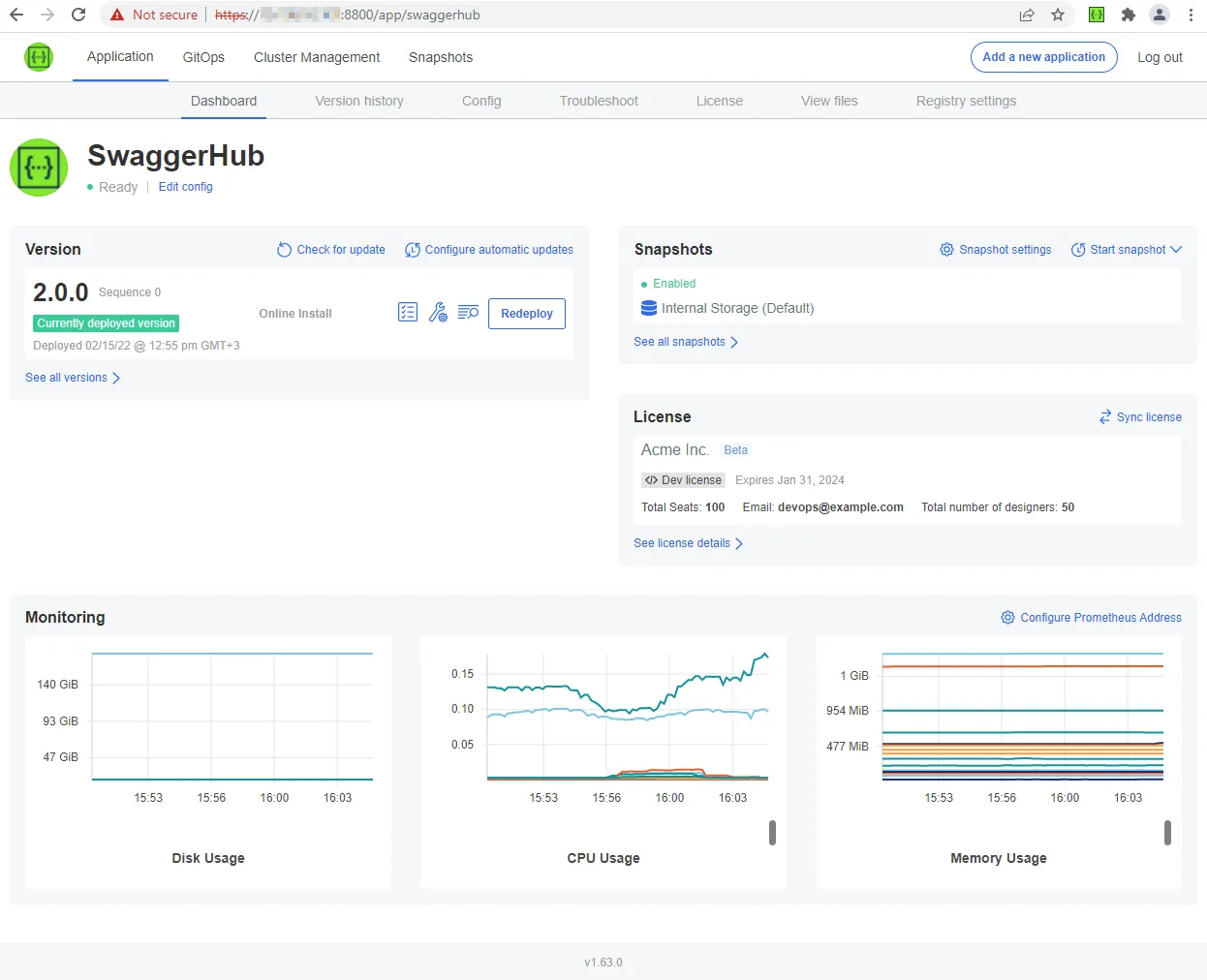
New Admin Console
Version 2.0.0 comes with a new Admin Console provided by Replicated KOTS. Besides the configuration interface, the Admin Console provides:
-
Velero integration for backup and restore via full or partial snapshots. You can create snapshots, configure scheduled snapshots, and set up the snapshot storage location directly from the Admin Console.
-
Prometheus integration for monitoring key system metrics.
-
Streamlined application updates. You can configure automatic update checks, see Swagger Studio release notifications directly in the Admin Console, and install updates with just a few clicks. Airgapped (offline) installations can be updated just as easily by uploading the new airgap bundle to the Admin Console. Updates can also be installed from the command line.
Learn more about the new Admin Console.
Other improvements and changes
-
New supported regions in AWS integrations: eu-south-1 and af-south-1. These regions can also be used when creating integrations by using Swagger Studio CLI and Registry API.
-
Usernames and the names of organizations, projects, APIs, domains, and versions can now contain multiple consecutive special characters. For example, multiple underscores
__. -
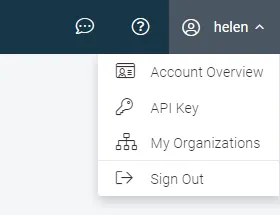
The user profile menu has been updated and now contains direct links to account settings, organizations list, and Swagger Studio API key.
-
Improved the display of the versions list in the editor in case of a large number of versions.
-
Updated Swagger UI to v. 4.0.4 and Swagger Editor to v. 4.0.3.
-
Updated Swagger Codegen to v. 3.0.31 for OpenAPI 3.0 and v. 2.4.25 for OpenAPI 2.0.
-
Removed the obsolete
scala-gatlingcode generator. -
The Swagger Studio On-Premise full version number format was changed from x.y.z**-**nn to x.y.z**+**nn, that is, with a plus (+) instead of a hyphen (-). The new version format is compatible with semantic versioning.
Configuration changes
As a result of the new deployment methods, some configuration settings were removed or replaced with alternatives. For details, see Differences Between Swagger Studio On-Premise 1.x and 2.x.
Upgrade notes
Swagger Studio On-Premise 2.0 must be a new installation. There is a migration path for existing 1.x instances to transfer your data to the new 2.0 installation.
Note: Some features of 1.x are currently not supported in 2.0 yet. For details, see Differences Between Swagger Studio On-Premise 1.x and 2.x.