
Getting Started with ZAPI Cloud
Problem
How to make API calls with ZAPI Cloud Installed
Cause
Installed ZAPI Cloud add - on and not sure how to proceed.
Solution
Follow the below steps to start using ZAPI Coud API’s
Steps:
Prerequisite : Installed ZAPI Cloud on the same JIRA Cloud instance where you have Zephyr for JIRA Cloud installed.
- Navigate to Administration -> Add-ons and find the ‘ZAPI’ page in the ‘Zephyr for JIRA Cloud’ section
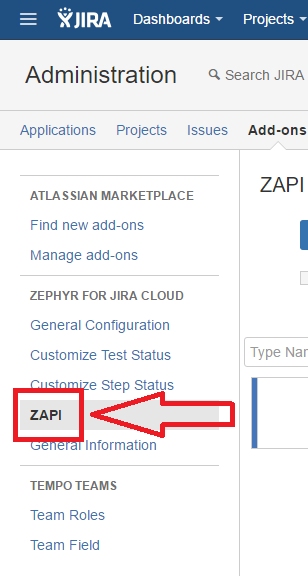
- Click the ‘Create System Key’ button, enter any desired user name, and click the ‘Submit’ button to create it

- The system key will have an Access Key and Secret Key associated to the user name you entered during creation. You can copy these from the ZAPI page
- Use the JWT generator published on Github to generate JWT tokens used for single calls
- JWT generator: https://github.com/zephyrdeveloper/zapi-cloud/blob/master/generator/java/compiled/jwt-generator.jar
- Source Code: https://github.com/zephyrdeveloper/zapi-cloud/tree/master/generator/java
- Note: Any JWT generator can be used. The above jar simply generates the JWT token and REST call at once
- Use the generated token to make a call to ZAPI Cloud Beta. Below is an Example REST API call using Postman browser REST Client.
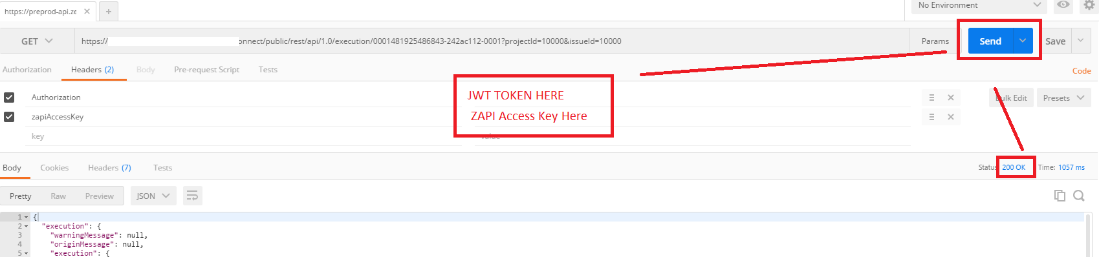
- Note: For base URI please use https://prod-api.zephyr4jiracloud.com/connect/
Useful Links
Documentation: https://zephyrdocs.atlassian.net/wiki/display/DEVELOPER/ZAPI+Cloud
Interactive API Documentation: http://docs.zfjcloud.apiary.io/#
Samples: https://support.getzephyr.com/hc/en-us/sections/203379103-Developer-Zone-ZAPI-for-Cloud
JWT generator: https://github.com/zephyrdeveloper/zapi-cloud/blob/master/generator/java/compiled/jwt-generator.jar