
TestLeft uses TestExecute’s engine to access tested applications’ windows and controls and to simulate user actions on them. Typically, to use TestExecute that way, you can simply launch the TestExecute executable. In certain cases, you may want to use the TestExecute command-line arguments to control the work of TestExecute better:
TestExecute.exe [/ErrorLog:file_name] [/SilentMode ]
[/install:extension_name] [/uninstall:extension_name] [/ns] [/RestServerPort:port] [/AccessKey:access_key]
The parentheses mean the group of command-line arguments. Square brackets mean that the argument or group of arguments is optional.
-
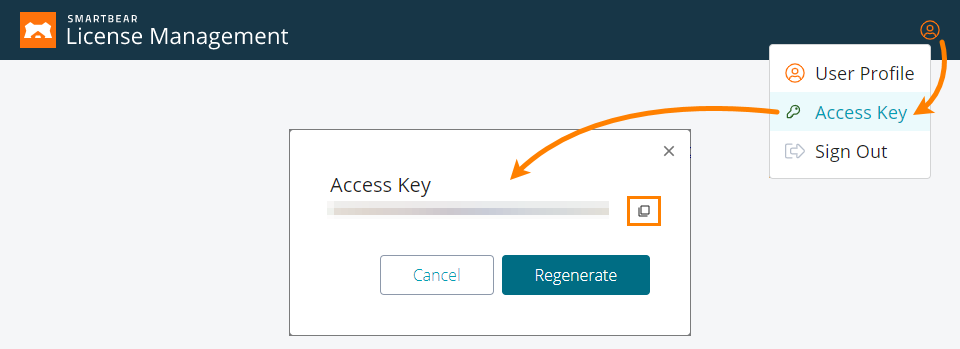
/AccessKey:access_key - If you use SmartBear License Management to control your product licenses, use this parameter to specify the access key assigned to your SmartBear account. This key will be used to license the product instance.
-
/ErrorLog:file_name - Commands TestExecute to save information on the errors that occurred during the run to the text file the file_name parameter specifies.
Notes:
-
Important: file_name should specify a non-existent file. If you specify the name of an existing file, TestExecute will fail to run the test.
-
We recommend that file_name specify the fully-qualified file name. If the parameter value does not include the folder path, TestExecute will save the file to a temporary folder that will be deleted after the test run is over.
-
-
/SilentMode - If this argument is specified, TestExecute works in silent mode, that is, it neither displays dialogs, nor informs you about errors or warnings. The dialogs and messages to be displayed are handled as if you pressed the default button in them. Information about these dialogs and messages is saved to the following file:
<Users>\<User_Name>\AppData\Roaming\SmartBear\TestExecute\15.0\Silent.log
The file should not be read-only or locked by another application.
The errors that occur during the test run are posted to the test log.
-
/install:extension_name (or /ip:extension_name) - Installs the specified extension and enables it. Extension_name specifies the fully-qualified name of the desired plugin (.pls file).
This argument helps you ensure that the REST API plugin is installed and enabled (this plugin is needed to exchange data with TestLeft tests).
-
/uninstall:extension_name (or /up:extension_name) - Uninstalls the specified extension. Extension_name specifies the fully-qualified name of the plugin (.pls file) that corresponds to the extension you want to uninstall.
This command does not delete the actual file from the disk.
- /ns - Starts TestExecute without displaying the “TestExecute has started” taskbar notification.
-
/RestServerPort:port - If the REST API plugin is installed and enabled in TestExecute, it commands the TestExecute RESTful service to use the specified port. Otherwise, the service will use the default port - 2377.
Note: If a firewall or an antivirus is running on your computer, make sure that it allows traffic through the specified port.
 Learn how to get the access key
 >
> 
The 32-bit executable of TestExecute is located in the <TestExecute>\Bin\ folder.
The 64-bit executable of TestExecute is located in the <TestExecute>\x64\Bin\ folder.
The 32-bit executable of TestExecute is located in the <TestExecute>\Bin\ folder.
The 64-bit executable of TestExecute is located in the <TestExecute>\x64\Bin\ folder.
The 32-bit executable of TestExecute is located in the <TestExecute>\Bin\ folder.
The 64-bit executable of TestExecute is located in the <TestExecute>\x64\Bin\ folder.
The 32-bit executable of TestExecute is located in the <TestExecute>\Bin\ folder.
The 64-bit executable of TestExecute is located in the <TestExecute>\x64\Bin\ folder.
The 32-bit executable of TestExecute is located in the <TestExecute>\Bin\ folder.
The 64-bit executable of TestExecute is located in the <TestExecute>\x64\Bin\ folder.
The 32-bit executable of TestExecute is located in the <TestExecute>\Bin\ folder.
The 64-bit executable of TestExecute is located in the <TestExecute>\x64\Bin\ folder.
The 32-bit executable of TestExecute is located in the <TestExecute>\Bin\ folder.
The 64-bit executable of TestExecute is located in the <TestExecute>\x64\Bin\ folder.
The 32-bit executable of TestExecute is located in the <TestExecute>\Bin\ folder.
The 64-bit executable of TestExecute is located in the <TestExecute>\x64\Bin\ folder.
The 32-bit executable of TestExecute is located in the <TestExecute>\Bin\ folder.
The 64-bit executable of TestExecute is located in the <TestExecute>\x64\Bin\ folder.
The 32-bit executable of TestExecute is located in the <TestExecute>\Bin\ folder.
The 64-bit executable of TestExecute is located in the <TestExecute>\x64\Bin\ folder.
The 32-bit executable of TestExecute is located in the <TestExecute>\Bin\ folder.
The 64-bit executable of TestExecute is located in the <TestExecute>\x64\Bin\ folder.
The 32-bit executable of TestExecute is located in the <TestExecute>\Bin\ folder.
The 64-bit executable of TestExecute is located in the <TestExecute>\x64\Bin\ folder.