
REST request properties define how ReadyAPI handles specific REST requests.
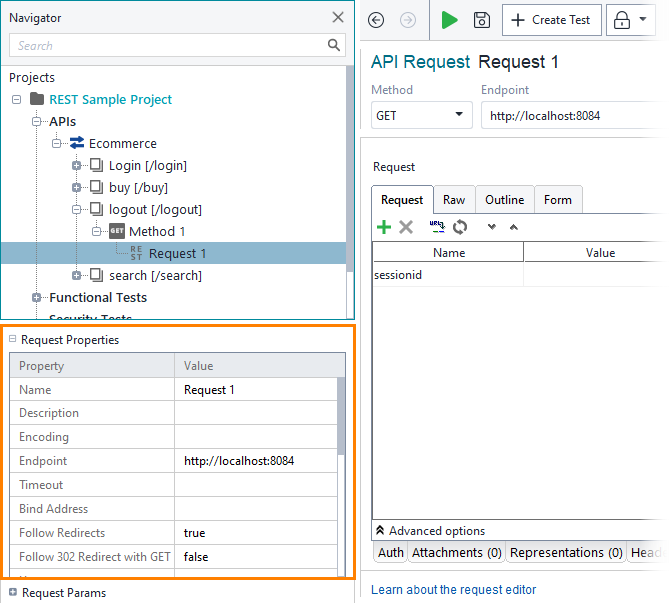
Click the image to enlarge it.
| Option | Description | ||
|---|---|---|---|
| Name | The name of the request. | ||
| Description | An arbitrary text describing the request. | ||
| Encoding |
The type of request data encoding – for example, UTF-8 or iso-8859-1. Encoding type is added as charset header.
|
||
| Endpoint |
The Resource part of the target URL (including the port number).
|
||
| Timeout | The number of milliseconds to wait for the server response. If no data arrives within the specified time period, the request is considered to fail. If the value is 0 or is not specified, the wait time is infinite. | ||
| Bind Address | The network interface (an IP address), through which ReadyAPI will send the request. | ||
| Follow Redirects |
If true, the request will follow the redirect and return the server message. Otherwise, a redirect message will be returned.
|
||
| Follow 302 Redirect with GET |
If true, ReadyAPI uses the GET method for subsequent requests if the response has the 302 Found HTTP code.
|
||
| Username | The basic authorization username. | ||
| Password | The basic authorization password. | ||
| Domain | Optional. The basic authorization domain. | ||
| Authentication Type | The Authorization type used for the request. | ||
| SSL Keystore | Specifies the file storing private keys that are used to authorize ReadyAPI to the server. Only works for HTTPS requests. | ||
| Strip Whitespaces |
If true, ReadyAPI removes comments and extra whitespaces from elements and attributes. Works for request contents in the XML format.
|
||
| Remove Empty Content |
If true, ReadyAPI removes empty elements from requests. Works for request contents in the XML format.
|
||
| Entitize Properties |
If true, ReadyAPI encodes special characters. For example, HTML symbols like & or > are entitized into & or >.
|
||
| Multi-Value Delimiter | The delimiter used for separating multiple values of the same parameter in the editor. To learn how to use it, see Send multi-value parameters. | ||
| Pretty Print |
If true, ReadyAPI uses line feeds and indentation to display XML data of responses.
|
||
| Dump File | The path to the file where responses will be saved. If empty, responses are discarded. | ||
| Max Size |
The maximum size of responses to be saved. 0 means the entire responses will be saved.
|
